Get Notified when the Software is Updated

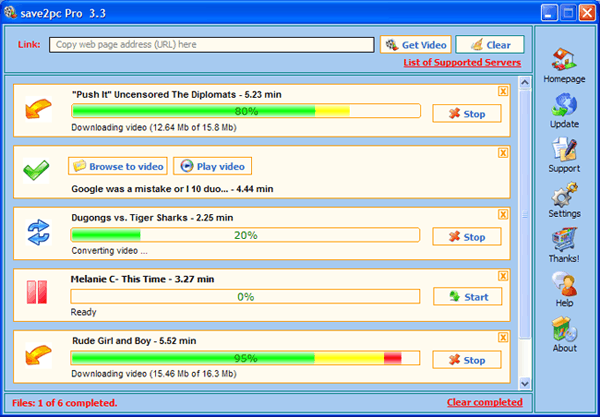
save2pc (formerly YouTube Downloader) is an easy-to-use tool designed to download and save YouTube videos directly to your computer. Its highly intuitive interface ensures simple operation, allowing users to efficiently save videos without requiring any technical experience. This makes it the best solution for users wanting a simple way to download YouTube videos to their desktop quickly and reliably.
Skip browser scripts and use this fast, lightweight program to start downloading right away. Its simple, clean interface ensures a smooth and intuitive experience, perfect for users who want a straightforward, efficient download tool.
save2pc Light is a free and effective tool that allows you to easily download and save desired videos from platforms like YouTube and Google Video. The program supports downloading high-quality (HQ) and high-definition (HD) videos, and then automatically converting them to popular formats such as AVI, MPEG, or FLV. To begin, users paste the video URL and click once to save it to their chosen folder, offering a seamless experience for downloading and converting online videos.
save2pc is free and powerful software that simplifies Flash video playback by allowing you to use your existing Media Player Classic, eliminating the need for additional external players. However, it is important to note that this tool does not support Adobe’s Secure RTMP Streaming. This makes it a convenient, no-cost solution for users who want to play Flash videos directly within Media Player Classic.
save2pc Features:
- Download videos from YouTube and save them as an FLV file to your PC or Laptop.
- Download videos from Facebook, Tangle, Godtube, Vimeo, Myspace, Break.com, Megavideo.com, TeacherTube, and Blip.TV, DailyMotion.
- Download videos from adult video servers. RedTube, PornoTube, Tube8, xTube, Spankingtube, YouPorn, Megaporn, yuvutu.
- Download videos from Xnxx, Spankwire, KeezMovies, Tnaflix, SlutLoad, DrTuber, veoh, PornHub, xVideos, xHamster, Rude.
- Download high-quality videos and high-definition videos.
- Supports automatic URL parsing and multi-thread downloading, making it easy to download multiple files from YouTube and other sites simultaneously.
- Convert downloaded videos to iPad, Sony PSP, Zune, PDA, iPhone, cell phone, Palm, Pocket PC.
- Save downloaded videos from YouTube and other sites into multiple formats, including .avi, .mpeg, .mp4, .mp3, .flv, and .wmv.
- Convert downloaded videos into additional mobile and audio formats, including MOV, MP4, 3GP, 3G2, MP3, and WAV.
- Preview selected videos before downloading. Get the size, length, rating, and views of a file before downloading it!
- YouTube flagged content age verification bypass. You don’t even need to create an account to download such videos.
save2pc – Pros & Cons
| Pros | Cons |
|---|---|
| ✓ Downloads videos from YouTube and numerous other supported video platforms through a simple URL-based workflow. | ✗ Compatibility with individual video websites can change as those services modify their streaming systems, so listed site support may not remain consistent over time. |
| ✓ Supports high-quality and high-definition video downloads, with automatic URL parsing and multi-threaded downloading for multiple files. | ✗ The software does not support Adobe Secure RTMP Streaming, which limits its ability to handle certain protected streaming sources. |
| ✓ Converts downloaded videos into multiple formats, including AVI, MPEG, MP4, MP3, FLV, WMV, MOV, 3GP, 3G2, and WAV. | ✗ Its many output formats and device-specific conversion options can make the conversion workflow more complicated than a basic video downloader. |
| ✓ Lets users preview videos and view details such as file size, duration, rating, and view count before downloading. | ✗ Some features are edition-dependent, with separate Light, Standard, Professional, and Ultimate downloads provided in the article. |
| ✓ Includes device-specific conversion options for platforms and devices such as iPad, Sony PSP, Zune, iPhone, cell phones, and Pocket PCs. | ✗ Downloading online videos may be subject to the terms, copyright rules, or access restrictions of the source service, so the software’s technical capabilities do not necessarily mean every video can be legally downloaded. |
Frequently Asked Questions
Can Save2PC download YouTube videos in HD?
Yes. The Ultimate edition supports High-Quality and High-Definition YouTube downloads, while the other editions have more limited video-quality support. The available quality also depends on what the source video provides.
Does save2pc work on Windows 11?
Yes. Current third-party download listings show support for Windows 11, and the developer continues to provide Windows downloads for its different editions.
Can Save2PC download videos without installing a browser extension?
Yes. It works as a standalone Windows application, so you can paste a video URL directly into the program instead of relying on browser scripts or extensions. The developer also provides a portable edition that runs without an installer.
What is the difference between save2pc and 4K Video Downloader Plus?
Both can download online videos, but their feature sets are different. save2pc uses separate editions with different site, quality, and conversion capabilities, while 4K Video Downloader Plus supports features such as full YouTube playlists and channels, 4K/8K downloads, subtitles, and cross-platform operation.
Official Homepage – https://save2pc.com