

Get Notified when the Software is Updated

WinfrGUI is a 100% FREE Windows data recovery utility with a GUI supported and endorsed by Microsoft. It fully utilizes the functionality of Windows File Recovery, Microsoft’s command-line recovery tool. Its interface is clean and intuitive, allowing users of all skill levels to recover deleted or lost Windows files with only a few clicks.
This application allows you to recover lost Windows files, including JPEG, PDF, DOCX, MP3, Excel, and ZIP files, from SSDs, HDDs, USB drives, and memory cards on Windows 11 and Windows 10 using NTFS, FAT, exFAT, or ReFS file systems.
WinfrGUI Features:
Designed to be compact and lightweight, WinfrGUI delivers reliable and powerful data recovery performance.
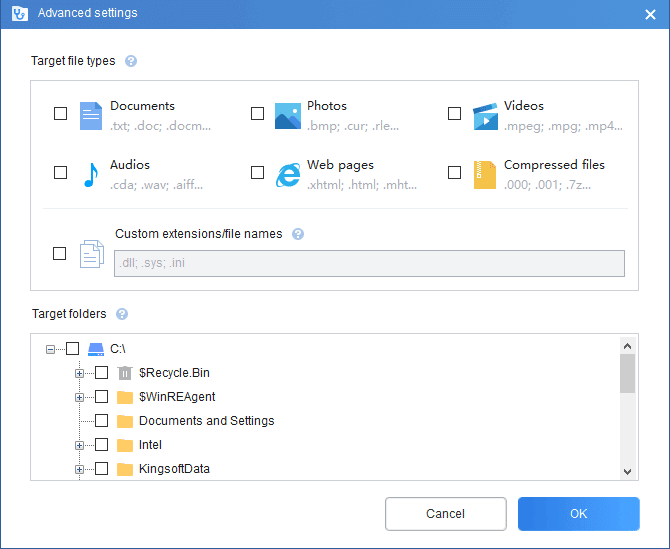
Recover lost files in many formats
- Recover image files in .JPEG, .PNG, TIFF, etc.
- Recover media files in .MP3, .MP4, .AVI, etc.
- Recover office files in .DOCX, .PDF, .XLSX, PPTX, etc.
- Recover ZIP files in .rar, .zip, etc.
Recover files in-depth
No matter which way you’ve deleted or lost Windows files – accidentally deleted, formatted, or corrupted hard drives- WinfrGUI works to recover them from the memory card. Data accuracy and completeness are ensured in this way.
Recover files from different storage.
Recover files from various storage devices, including SSD, HDD, and USB.
Support 2 scan modes.
- Quick scan. Fast scanning speed; Recover files with the directory structure and file names under the NTFS file system.
- Deep Scan. Recovers more files that have lost directory structure and file names.
WinfrGUI is completely free to download and use, and it always will be. There are no in-app purchases, subscriptions, or hidden fees. Regardless of the scanning method used or the type of files recovered, you can use the software at no cost.
WinfrGUI – Pros & Cons
| Pros | Cons |
|---|---|
| ✓ Recovers deleted or lost files from SSDs, HDDs, USB drives, and memory cards on supported Windows systems. | ✗ Supports only Windows 10 and Windows 11, with no other operating systems listed. |
| ✓ Supports common image, media, office, PDF, and archive formats, including JPEG, MP3, MP4, DOCX, XLSX, PPTX, PDF, ZIP, and RAR. | ✗ Quick Scan preserves directory structure and file names only under the NTFS file system, while Deep Scan is needed when that information has been lost. |
| ✓ Provides Quick Scan and Deep Scan modes, allowing users to choose between faster recovery with directory information and deeper file searching. | ✗ Deep Scan can recover files without their original directory structure and file names, which can make recovered data harder to identify and organize. |
| ✓ Uses a graphical interface for Microsoft’s Windows File Recovery functionality, avoiding the need to work directly with a command-line recovery tool. | ✗ The software is specifically designed for Windows file recovery, so it does not provide broader backup, disk-imaging, or general system-recovery functions in the documented feature set. |
| ✓ Is completely free to use, with no in-app purchases, subscriptions, or hidden fees. | ✗ Recovery results depend on the type and condition of the lost data; the provided content describes the supported recovery methods and file systems but does not guarantee successful recovery of every deleted or corrupted file. |
Frequently Asked Questions
Can WinfrGUI recover permanently deleted files?
It can attempt to recover deleted, formatted, or corrupted files from supported Windows storage devices. However, successful recovery is not guaranteed, especially when the original data or directory information has been lost.
What file systems does WinfrGUI support?
It supports NTFS, FAT, exFAT, and ReFS file systems. It can recover supported files from SSDs, HDDs, USB drives, and memory cards on Windows 10 and Windows 11.
What is the difference between WinfrGUI Quick Scan and Deep Scan?
Quick Scan is faster and can preserve the original directory structure and file names when recovering from NTFS. Deep Scan searches more extensively for lost files but may not retain their original directory structure or file names.
What is the difference between WinfrGUI and Windows File Recovery?
WinfrGUI provides a graphical interface for Microsoft’s Windows File Recovery functionality, making file recovery easier for users who do not want to use command-line commands. Both are based on the same underlying Windows recovery functionality.
Official Homepage – https://www.winfr.org
Supported Operating Systems: Windows 11 and 10
Supported File Systems: NTFS, FAT, exFAT, ReFS.
Size: 3.98 MB
