Get Notified when the Software is Updated

Wise Game Booster is a free game optimization tool designed to enhance your PC performance by closing background processes and unnecessary Windows services. With its simple “Optimize All” button, you can boost your gaming experience with just one click.
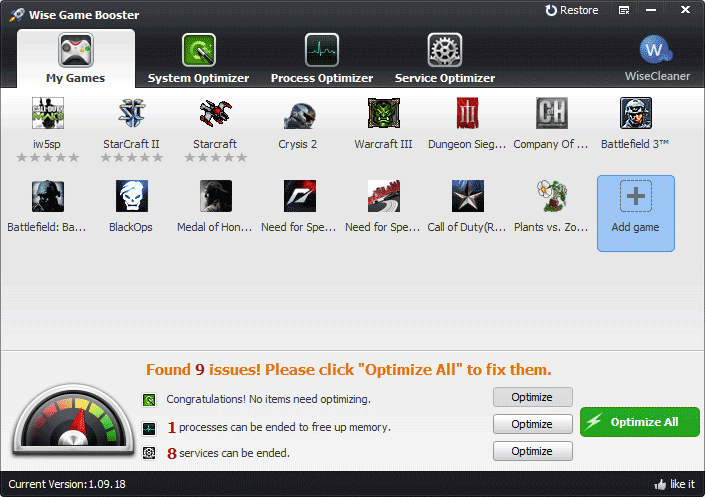
Users can add their favorite games to the “My Games” box, reducing the need to search through messy desktop icons or folders. This organized interface ensures you can focus solely on gaming.
The System Optimizer uses features from Wise Care 365 to help improve system performance while gaming. It helps fine-tune your system for smoother gameplay.
Advanced users can manually stop specific processes or services using the Process Optimizer and Services Optimizer, with built-in suggestions indicating safe and beneficial actions.
If disabling a service affects performance or system stability, Wise Game Booster includes a backup and restore feature that lets you easily revert to previous settings without risking your system.
Developed by WiseCleaner, Wise Game Booster is completely free software. Users can use the software, install updates, and receive basic technical support free of charge.
Wise Game Booster Features:
- System Optimization
- Process Management
- Service Management
- Manual Optimization
- 1-Click Optimization
- Gamebox for Gamer
- Resume Center for Services
- Free up Memory to boost games
Wise Game Booster – Pros & Cons
| Pros | Cons |
|---|---|
| ✓ Optimizes gaming performance by closing unnecessary background processes and Windows services with a single click. | ✗ Performance improvements depend on the system’s hardware and the number of unnecessary background processes running. |
| ✓ Includes dedicated system, process, and service optimization tools, giving users both automatic and manual performance controls. | ✗ Available only for Windows, with no native support for macOS or Linux. |
| ✓ Features a Gamebox that organizes installed games, making them easier to launch from one location. | ✗ Primarily focuses on software optimization and cannot overcome hardware limitations such as an outdated CPU or GPU. |
| ✓ Provides backup and restore functionality, allowing users to revert optimization changes if needed. | ✗ Manual optimization options may require users to understand Windows services and processes before making changes. |
| ✓ Completely free to use, including software updates and basic technical support. | ✗ Supports Windows versions only up to Windows 10 according to the provided overview, with no stated compatibility for Windows 11. |
Frequently Asked Questions
Does Wise Game Booster increase FPS?
It can improve gaming performance by freeing system resources, reducing background activity, and optimizing Windows settings. However, FPS gains vary depending on your hardware, the game you are playing, and whether the CPU, GPU, or memory is the system bottleneck.
What is the difference between Wise Game Booster and Razer Cortex?
Both applications optimize Windows for gaming by reducing unnecessary background processes. Wise Game Booster focuses on simple system optimization and manual control, while Razer Cortex also includes game launching, FPS tracking, and additional gaming-related features.
Is Wise Game Booster safe to use?
Yes. It is designed to temporarily optimize Windows by stopping selected background processes and services. It also includes a backup and restore feature so you can easily revert any changes if needed.
Can Wise Game Booster optimize Steam and Epic Games titles?
Yes. You can manually add games from Steam, Epic Games Store, or other launchers to the My Games list and optimize your system before launching them. It works with supported Windows games regardless of where they were installed.
What’s New in Wise Game Booster 1.57:
- Perfectly compatible with 4K UHD monitors, supports 100%, 150%, and 200% scaling
- Fixed an issue where the interface is not responding when searching for local games
- GUI and usability improvements
Official Homepage – https://www.wisecleaner.com
Supported Operating Systems: Windows XP, Vista, 7, 8, 8.1, 10 (32 and 64 bits)