

Contents
Why Windows Security and Performance Matter
Windows security and performance tools help protect your PC from threats while keeping your system fast and stable. Windows PCs face constant security threats, including malware, ransomware, phishing attacks, and spyware. At the same time, background services, startup programs, and system clutter can gradually reduce performance. Maintaining both strong security and smooth performance is essential for stability, speed, and data protection. Choosing the right combination of protection and optimization tools ensures your system stays secure without sacrificing speed.
Built-In Windows Security Features
Modern versions of Windows 10 and Windows 11 include built-in protection tools designed to provide baseline security without requiring additional software. Microsoft Defender Antivirus delivers real-time protection against viruses, ransomware, spyware, and other malware threats. It uses cloud-based threat intelligence and automatic definition updates to maintain current protection.
Windows Defender Firewall monitors inbound and outbound network traffic, blocking unauthorized access and suspicious connections. When properly configured, it adds a strong network protection layer without significantly affecting system performance.
Microsoft Defender SmartScreen helps prevent phishing attacks and malicious downloads by warning users about unsafe websites and untrusted applications. Features such as Core Isolation and Memory Integrity add hardware-based protection against advanced exploits on supported systems.
In most modern systems, built-in Windows security provides balanced protection with moderate resource usage. For many home users, default protection is sufficient, while advanced users may choose third-party tools for extended features or specialized controls.
Best Firewall and Protection Tools
While antivirus software detects threats, firewall tools help control incoming and outgoing network traffic. A properly configured firewall, such as Windows Firewall Control, prevents unauthorized access, blocks suspicious connections, and enhances privacy. These protection tools add a security layer to safeguard your Windows PC from network-based attacks and hidden vulnerabilities.
Best Cleanup and Optimization Tools
Over time, temporary files, unused registry entries, startup programs, and background services slow down Windows systems. Cleanup and optimization tools like CCleaner help remove unnecessary files, manage startup applications, and fine-tune system performance. The following tools are chosen for their effectiveness, safety, and minimal impact on system stability.
Lightweight Tools for Low RAM PCs
Older PCs or systems with 2–4 GB RAM require carefully selected software that provides protection and optimization without heavy resource usage. Designed with efficiency in mind, lightweight solutions such as AVG AntiVirus FREE reduce CPU and memory demands while preserving critical security and performance functions. These tools are a practical choice for budget systems and older devices where stability and speed are essential.
Security and Performance Comparison Table
Choosing the right tool can be challenging, especially when multiple solutions offer similar features. The comparison table below highlights key differences in performance impact, protection level, system requirements, and ideal use cases. This quick overview helps you select the most suitable solution for your Windows setup.
| Software | Protection Level | System Impact | Best For | Free Version |
|---|---|---|---|---|
| Kaspersky Free Antivirus | High | Low | Balanced security | Yes |
| Bitdefender Antivirus Free | Very High | Very Low | Automatic protection | Yes |
| AVG AntiVirus Free | High | Low | Low RAM PCs | Yes |
| Avast Free Antivirus | High | Medium | Extra features | Yes |
| Malwarebytes | High (Cleanup) | Low | Removing infections | Limited |
Real-World Performance Testing
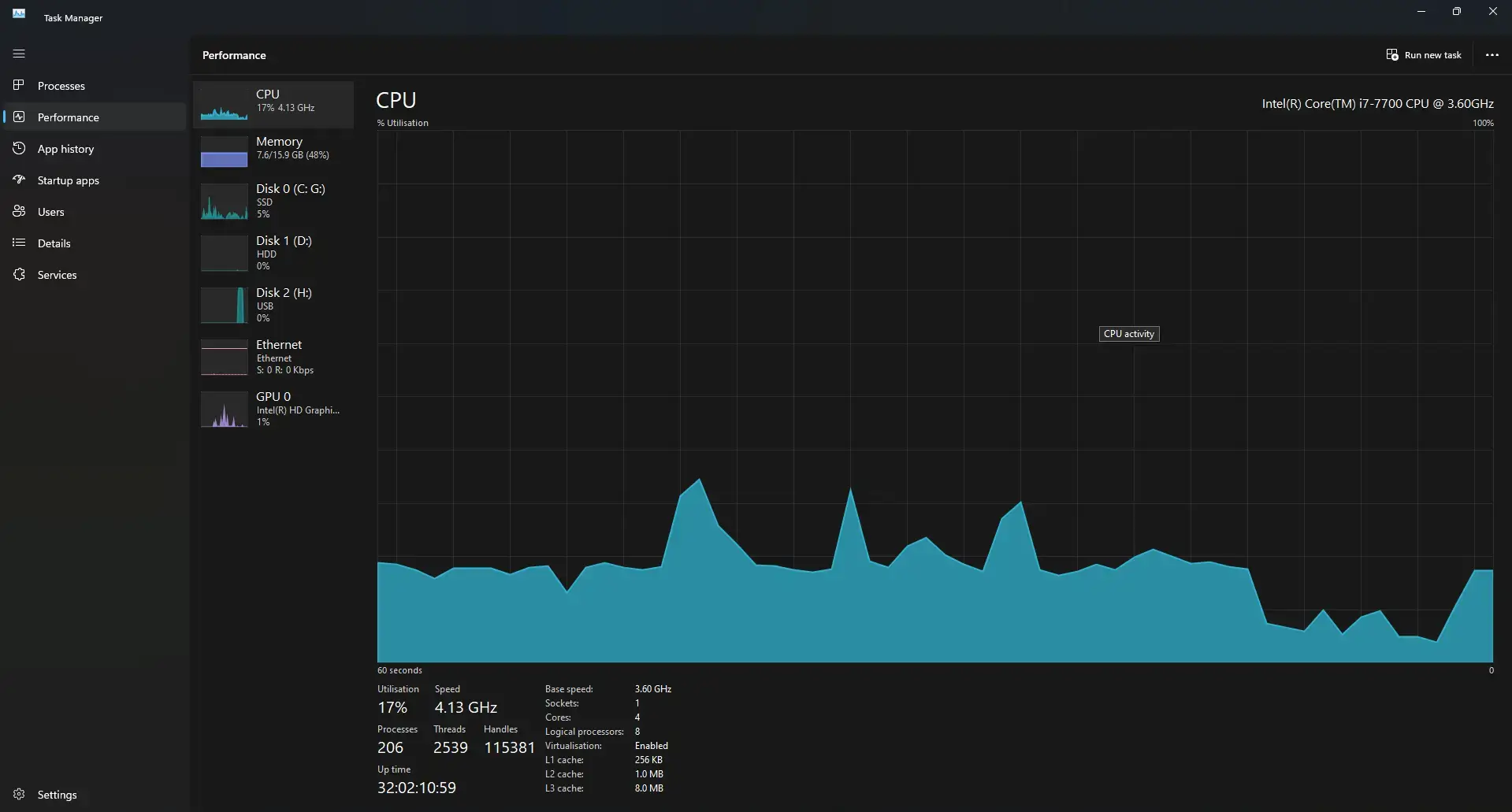
Testing was conducted on Windows 11 Pro 23H2 using an 8 GB RAM system with SSD storage under standard home-user workload conditions. Performance was monitored using Windows Task Manager and Resource Monitor during idle state, full system scans, and startup cycles to evaluate real-time resource impact.
During testing on an 8 GB RAM system, idle memory usage ranged between 120 MB and 480 MB, depending on the antivirus solution. On a 250 GB SSD, full scans consumed approximately 30% to 55% of CPU usage and took between 8 and 22 minutes to complete. Boot time impact remained minimal, typically adding 2-6 seconds.
These results reflect Windows 11 security performance under standard home usage conditions and may vary depending on hardware configuration, installed software, and background processes.
Limitations and Considerations
Although free antivirus and optimization tools deliver reliable baseline protection, they may have certain restrictions. Advanced features such as dedicated ransomware rollback, built-in VPN services, identity monitoring, and enterprise-level management controls are typically reserved for premium versions.
Some free solutions may display upgrade prompts or promotional notifications. In addition, customization options, firewall controls, and privacy tools may be more limited than those offered by paid security suites.
Users should evaluate their system specifications, usage habits, and risk exposure before choosing a security solution. Home users with standard browsing and office tasks may find free tools sufficient, while business environments or high-risk usage scenarios may require advanced protection features.
Which Security Tool Is Right for Your System?
Choosing the right security solution depends on your hardware configuration, usage habits, and protection needs. System resource availability and daily workload play a major role in determining the best option.
- For low-RAM PCs (2GB–4GB):
- Lightweight antivirus solutions with low memory consumption and minimal background services are recommended. Tools such as AVG AntiVirus Free or Bitdefender Antivirus Free help maintain stable performance while providing essential real-time protection.
- For mid-range home systems (8GB RAM or higher):
- Balanced security solutions like Kaspersky Free Antivirus offer strong malware detection with low system impact, making them suitable for everyday browsing, downloads, and office tasks.
- For users who want advanced features:
- Avast Free Antivirus provides additional layers of protection, including web and email protection. Users seeking deeper configuration and extended privacy tools may consider premium security suites.
- For already infected systems:
- Malwarebytes is particularly effective for detecting and removing advanced threats, adware, and potentially unwanted programs that traditional antivirus tools may miss.
Selecting a tool based on system specifications and risk level helps optimize both Windows security performance and overall system stability.
Final Recommendations
Choosing the right Windows security and performance tools depends on your system specifications, risk level, and daily workload. For balanced protection with low system impact, Kaspersky Free Antivirus is a strong choice. If you prefer automatic cloud-based security with minimal configuration, Bitdefender Antivirus Free stands out. Users with low-RAM PCs may benefit from lightweight options like AVG AntiVirus Free, while Avast Free Antivirus suits those who want extra protection features. Malwarebytes remains highly effective for cleaning infected systems. Selecting the right combination ensures your Windows PC stays secure, fast, and stable throughout 2026.
Frequently Asked Questions
What are the best Windows security and performance tools for home users?
The best Windows security and performance tools for home users combine reliable malware protection with low system impact. Built-in Windows Defender offers solid baseline protection, while tools like Kaspersky Free Antivirus or Bitdefender Antivirus Free provide enhanced detection with minimal performance slowdown.
Do Windows security tools slow down system performance?
Modern Windows security tools are designed to use minimal CPU and memory resources. On systems with 8 GB or more of RAM, the software typically has a low performance impact during idle periods. Full system scans may temporarily increase CPU usage, but this typically returns to normal after the scan completes.
Are free antivirus programs enough for Windows 11?
For standard home usage such as browsing, streaming, and office work, free antivirus solutions are generally sufficient. However, users who require advanced privacy features, identity monitoring, or business-level protection may benefit from premium security suites.
Which security tool is best for low-RAM PCs?
Lightweight antivirus programs such as AVG AntiVirus Free and Bitdefender Antivirus Free are suitable for systems with 2–4 GB RAM. These tools maintain essential real-time protection while keeping memory usage low to preserve system responsiveness.
How can I improve Windows security without affecting speed?
You can improve Windows security without slowing it down by combining built-in protection with lightweight optimization tools. Keeping Windows updated, reducing startup programs, and using efficient antivirus software help ensure strong protection while maintaining smooth performance.
Should I use more than one antivirus program on Windows?
Using multiple real-time antivirus programs simultaneously is generally not recommended because they can conflict with each other and consume additional system resources. A single primary antivirus solution, combined with Windows’ built-in security features and other specialized tools when needed, is a more practical approach.
Can I use Windows Security with a third-party antivirus program?
Windows includes several built-in security features, including Microsoft Defender Antivirus, Defender Firewall, and SmartScreen. How these features interact with third-party security software varies by product and configuration, so users should avoid unnecessarily enabling overlapping real-time protection.
Does Windows Security include a firewall?
Yes. Windows includes Microsoft Defender Firewall, which monitors inbound and outbound network traffic and helps block unauthorized access and suspicious connections. It provides a built-in network protection layer without requiring a separate firewall application.
Best Antivirus Software for Windows
Antivirus software is the foundation of Windows security. A good antivirus solution provides real-time protection, detects advanced threats, blocks ransomware, and prevents phishing attacks without heavily impacting system performance. The tools listed below are selected based on detection accuracy, system impact, long-term reliability, and independent laboratory evaluations from organizations such as AV-Test and AV-Comparatives. Selection criteria focus on real-world malware detection rates, false-positive performance, and overall system resource consumption in 2026.
Kaspersky Free Antivirus
Kaspersky Free Antivirus delivers strong malware detection while maintaining a lightweight footprint on system resources. It offers real-time protection against viruses, ransomware, phishing attempts, and malicious websites without significantly slowing down Windows performance. The interface is simple and beginner-friendly, making it suitable for both home users and office PCs. For users who want reliable core protection without advanced premium features, Kaspersky Free provides an excellent balance between security strength and efficiency.
Bitdefender Antivirus Free
Bitdefender Antivirus Free delivers powerful cloud-based protection with minimal configuration required. It automatically blocks malware, zero-day threats, and suspicious files using advanced behavioral detection technology. One of its main benefits is its low background resource usage, which makes it suitable for mid-range and older hardware. Bitdefender is ideal for users who prefer strong automatic protection with minimal user interaction.
Avast Free Antivirus
Avast Free Antivirus offers a feature-rich security solution that includes real-time threat detection, web protection, email scanning, and ransomware shields. It provides multiple layers of protection while maintaining reasonable system performance. Avast is a good choice for users who want additional security features beyond basic antivirus scanning, including protection against unsafe downloads and malicious websites.
Malwarebytes
Malwarebytes is widely known for detecting and removing advanced threats, including spyware, adware, and potentially unwanted programs. While often used as a secondary security tool, it provides strong real-time protection in its premium version. Malwarebytes is highly effective in cleaning infected machines and targeting threats that conventional antivirus software occasionally misses.
