

Get Notified when the Software is Updated

Smarty Uninstaller 4 is a powerful tool for completely removing unwanted programs. It monitors the built-in uninstaller and then uses an advanced scan engine to delete any leftover files, ensuring a clean and thorough removal of both 64-bit and 32-bit applications from your system.
Smarty Uninstaller 4 gives you full control over your programs. You can manually launch the scan engine at any time to force the uninstallation of a program with a broken uninstaller. Beyond its smart scan engine, the software also features the powerful Smarty Snapshot, which provides an easy-to-use yet highly effective way to manage your system.
The Smarty Snapshot feature in Smarty Uninstaller 4 lets you monitor the installation of new applications and track every change made to your system. These changes are saved to the snapshot, which can be accessed later for a complete uninstall, ensuring no leftovers are left behind.
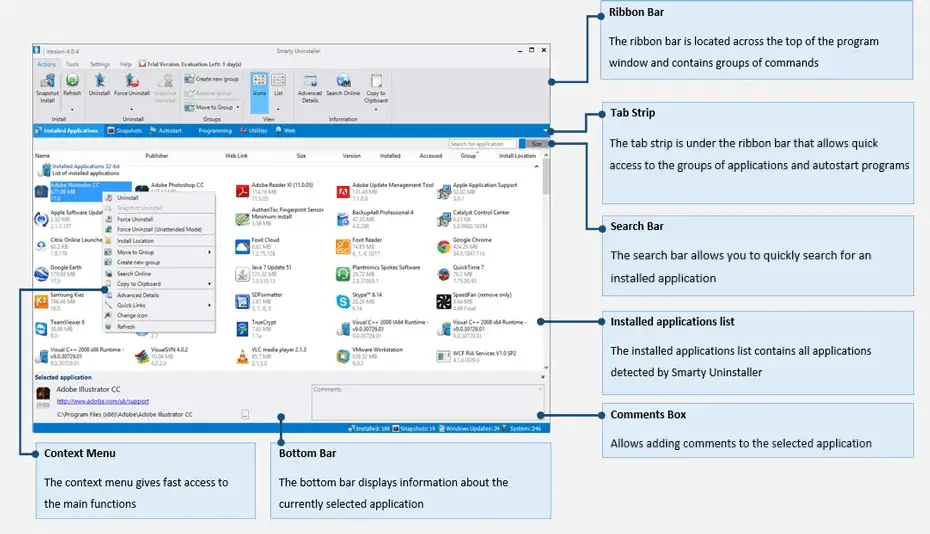
Smarty Uninstaller 4 features an intuitive and modern interface that serves as a powerful Uninstall Manager. It displays all installed software, broken installations, system components, and Windows updates, allowing you to remove unwanted applications with a few clicks. The program is notably faster than the standard Windows Add/Remove Programs tool.
Smarty Uninstaller 4 offers smart organization tools, including a grouping feature that allows you to organize applications into logical categories and view them in separate tabs. It also allows you to add personal comments to installed applications, which are displayed on the main window when you select a program, helping you keep track of your software.
Smarty Uninstaller 4 provides a powerful solution for managing your installed programs. It accurately identifies and displays broken installations, system components, and Windows Updates alongside your regular applications. You can easily group and sort programs to your preference. Additionally, its advanced scan engine can detect and remove residual traces, ensuring complete removal even if the standard uninstaller fails.
Smarty Uninstaller – Pros & Cons
| Pros | Cons |
|---|---|
| ✓ Removes both 32-bit and 64-bit applications while scanning for leftover files after the standard uninstall process. | ✗ The software is supported only on Windows 7, 8, 8.1, 10, and 11, with no macOS or Linux version documented. |
| ✓ Can force removal when a program’s built-in uninstaller is broken by manually launching its scan engine. | ✗ Its deep scanning and forced-uninstallation features can make removal operations more involved than using the standard Windows uninstall process. |
| ✓ Smarty Snapshot records system changes made during an application installation and can later use that information for a complete uninstall. | ✗ Smarty Snapshot needs to have monitored an application’s installation in advance to record the system changes associated with that installation. |
| ✓ Manages installed applications, broken installations, system components, and Windows updates from a single program list with grouping and sorting options. | ✗ The program can display system components and Windows updates alongside ordinary applications, so users need to distinguish carefully between removable software and system-related entries. |
| ✓ Supports application organization with categories and personal comments, while its recent search update can also locate programs by publisher name. | ✗ The provided download is about 8.09 MB, but the page does not document a separate portable edition or additional operating-system builds. |
Frequently Asked Questions
Is Smarty Uninstaller free to use?
Yes. The download section presents Smarty Uninstaller as “100% Free Now,” and the supplied page does not document a subscription or separate paid edition.
What is Smarty Uninstaller used for?
Smarty Uninstaller is used to remove unwanted Windows programs and clean up leftover files after uninstallation. It can also handle broken uninstallers, track installation changes with Smarty Snapshot, and organize installed applications for easier management.
How does Smarty Uninstaller work?
The software monitors the standard uninstallation process and then uses its scan engine to identify and remove remaining files associated with the program. Its Smarty Snapshot feature can also record system changes made during an application’s installation and use that information later for a more complete removal.
What is the difference between Smarty Uninstaller and Revo Uninstaller?
Both applications focus on removing Windows programs and finding leftover data after standard uninstallation. Smarty Uninstaller additionally uses Smarty Snapshot to track installation changes for later removal, whereas the supplied page does not document the equivalent workflow for Revo Uninstaller.
What’s New in Smarty Uninstaller 4.92.3:
- New Search now finds applications by publisher name.
- New UI improvements.
- Enhanced: Better translations and localization across all supported languages.
- Enhanced: The application list no longer jumps when new applications are detected.
- Improved security of the automatic update process.
- Fixed Other minor issues and improvements.
Official Homepage – https://www.smartuninstall.com
Supported Operating Systems: Windows 7, 8, 8.1, 10, 11 (32-bit, 64-bit).
Size: 8.09 MB
