Get Notified when the Software is Updated

Express Burn is a dependable disc-burning application that lets you create Audio CDs, Data CDs, DVDs, and Blu-ray Discs. Developed by NCH Software, this free utility for Windows and macOS makes it easy to burn audio, video, and data discs, making it one of the top disc-burning solutions available.
With Express Burn, you can quickly burn discs by dragging the desired files onto the application icon and selecting “Burn CD.” The software handles the process automatically, including converting file formats when necessary.
Express Burn is one of the fastest CD, DVD, and Blu-ray burning programs available, using proprietary optimization technology to deliver fast and reliable burning performance.
Express Burn Plus expands these capabilities by adding support for video DVD creation, data DVDs, Blu-ray Discs, additional file formats, and advanced features such as creating and burning ISO image files.
Express Burn Features:
Audio CD Recording
- Audio is recorded with direct digital recording, so it maintains perfect audio quality.
- Create MP3 CDs or Audio CDs for traditional CD players
- Audio CD burner supports a wide range of audio formats, including WAV, MP3, WMA, OGG, FLAC, and more
- Normalize audio volume and customize the pause between tracks when burning audio CDs
Video DVD Authoring and Blu-ray Burning
- Record video files to PAL or NTSC
- Video files are re-encoded for standard movie discs
- Video burning supports AVI, MPG, VOB, WMV, MP4, OGM, and all video formats with a DirectShow-based codec
- Create and manage chapters on DVD and Blu-ray discs
- Template menu screens and buttons for DVD authoring
- Widescreen or standard formats for video burning
Data CD, DVD, or Blu-Ray Writing
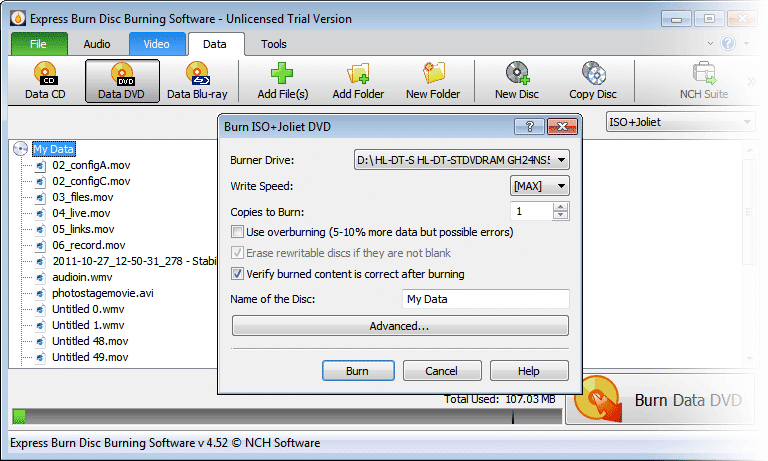
- Burn data discs as ISO/Joliet, UDF, or Hybrid
- The ISO burner will record ISO images to a disc
- Create ISO files in addition to burning to a disc
- Burn Blu-ray data and video discs
Advanced Disc Burning Features
- Burn to recordable/re-recordable discs (CDR, CDRW)
- Copy and burn DVDs and other discs
- Command-line operation for automation and integration with other programs
- None of the NCH Software products can break copy-protected or region-protected videos. The audio and video functionality is designed for recording your own content onto discs.
Express Burn – Pros & Cons
| Pros | Cons |
|---|---|
| ✓ Supports Audio CDs, MP3 CDs, data CDs, DVDs, and Blu-ray Discs from a single application. | ✗ Advanced capabilities such as video DVD creation, data DVDs, Blu-ray support, and ISO features are in Express Burn Plus, not the basic free edition. |
| ✓ Handles multiple audio formats, including WAV, MP3, WMA, OGG, and FLAC, with volume normalization and customizable track pauses. | ✗ Video files may need to be re-encoded when creating standard movie discs, which can add processing time before burning. |
| ✓ Provides video DVD authoring with PAL/NTSC support, chapter creation, menu templates, and widescreen or standard formats. | ✗ Blu-ray and DVD burning requires compatible optical hardware and recordable media, which limits its usefulness on computers without disc drives. |
| ✓ Supports ISO creation and burning, along with ISO/Joliet, UDF, and Hybrid data-disc formats. | ✗ The software cannot bypass copy protection or region protection and is intended for recording users’ own audio and video content. |
| ✓ Offers command-line operation for automation and supports both Windows and macOS. | ✗ The listed macOS requirement starts at macOS 10.5, while Windows support begins with Windows 8, so the documented compatibility range depends on specific operating-system versions. |
Frequently Asked Questions
Is Express Burn really free?
Yes, the basic edition is available as a free download for non-commercial use. However, some advanced capabilities, including data DVD/Blu-ray burning and ISO creation, are available only in Express Burn Plus.
Can Express Burn burn MP3 files to an Audio CD?
Yes. You can add supported audio files and create an Audio CD that can be played in compatible traditional CD players. The software also provides options for normalizing volume and adjusting the pauses between tracks.
Why is Express Burn not recognizing my CD or DVD drive?
A missing or unrecognized drive can prevent a disc from being burned. NCH Software’s support documentation specifically includes drive or media recognition problems and failed CD/DVD burns as troubleshooting topics, so checking the drive connection, compatible media, and drive selection is a good starting point.
Is Express Burn better than CDBurnerXP?
It depends on your needs. Express Burn supports Windows and macOS and includes audio, video, DVD, and Blu-ray authoring features, while CDBurnerXP is a Windows-focused disc-burning application; Express Burn is therefore more suitable when cross-platform support or video/Blu-ray authoring is important.
Official Homepage – https://www.nch.com.au
Supported Operating Systems:
- Windows 8, 8.1, 10, 11.
- macOS 10.5 or above