Get Notified when the Software is Updated

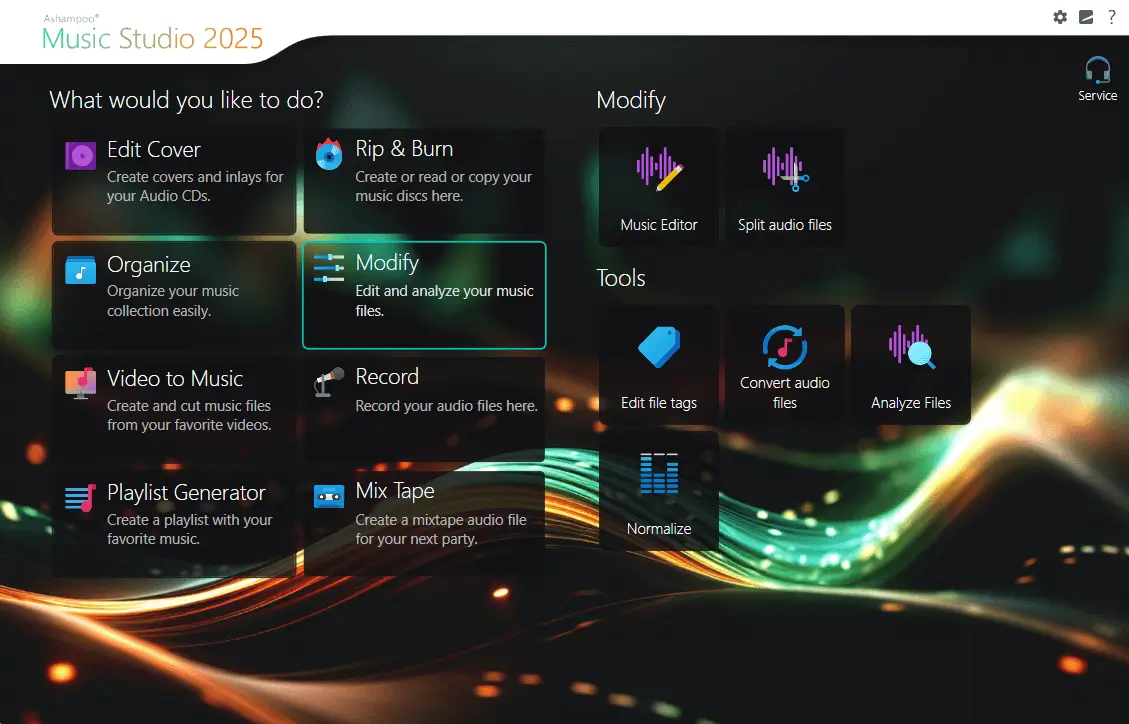
Ashampoo Music Studio 2025 is a comprehensive music software from Ashampoo designed to help you effortlessly cut, organize, and burn songs and audiobooks to disc. Featuring clever cutting options, fast ripping capabilities, and a smart cover editor, Music Studio 2025 is a true all-in-one solution for any audio file, making audio management simpler than ever.
This Ashampoo program provides robust tools for managing your audio files. You can easily burn or convert files into different audio formats, with full support for APE files.
The integrated audio editor gives you precise control, allowing you to modify or remove specific passages and split tracks into separate parts. Beyond editing, the various options to rename and organize your files will transform any cluttered folder of songs into a genuine, well-structured music library.
The integrated audio editor in Ashampoo Music Studio 2025 provides precise control, enabling users to modify or remove individual passages. You can also easily split tracks (like MP3s) into separate sections or seamlessly recombine them with in-place snapping.
Ashampoo Music Studio 2025 makes reorganizing music libraries incredibly easy, transforming chaotic collections into perfectly structured audio archives.
Ashampoo Music Studio 2025 offers powerful tools for comprehensive audio management. Metadata can be easily edited, songs normalized for consistent volume, and tracks renamed using customizable naming schemes, transforming disorganized collections into well-formatted libraries.
Additionally, the innovative Mix Tape feature allows users to create seamless song mixes using crossfades or custom pauses, resulting in a truly personalized listening experience.
Ashampoo Music Studio 2025 further enhances your audio projects by allowing you to extract audio from existing video files and save it. This is ideal for creating custom ringtones or using it as background music in your homemade videos.
The program’s built-in cover editor makes it simple to design professional-looking covers. You can create them based on original cover art, or unleash your creativity with custom designs and inlays using the multiple integrated templates.
Ashampoo Music Studio 2025 Highlights:
- Audio file recording
- Burn audio CDs
- Rip audio CDs
- Extract audio from videos
- Convert audio files into various formats
- Edit and auto-complete metadata
- Edit and normalize sound files
- Mix tracks with fading
- Versatile cover editor with multiple templates
Perfect mix tapes for every event
Create mix tapes for your next party in just a few clicks with Ashampoo Music Studio! Easily set the mood with fitting transitions and fades, then pick your preferred file format and sound quality, and you’re good to go. Whether it’s a casual gathering, a wedding, or another formal occasion, effortlessly create the right ambience with Ashampoo Music Studio!
Create Versatile Playlists
With Ashampoo Music Studio 2025, you can effortlessly create playlists that play your songs in any desired order on almost any device. Thanks to its extensive support for multiple audio formats, including M3U, PLS, WPL, and XSPF, playlists generated with Ashampoo Music Studio 2025 are compatible with nearly every playback device.
Rip CDs Quickly and Easily
Turning your music and audiobooks into a more space-saving digital format is a breeze with Ashampoo Music Studio 2025. Thanks to a massive database, ripped tracks are automatically named and tagged with the correct cover art before being saved in the format of your choice, making the process seamless and efficient.
Fast Song Renaming
Incomplete or inconsistent file names can ruin your song collection. Ashampoo Music Studio 2025 includes smart auto-naming based on customizable file naming schemes. Bring order to individual tracks or entire folders with a single click, saving time and effort with this handy feature.
Extract Audio from Videos
Ashampoo Music Studio 2025 quickly extracts audio tracks from videos. Whether you want to enjoy an epic soundtrack from your favorite movie on its own or turn sounds and quotes into ringtones, this music program gets the job done quickly.
Useful Tools for Your Sounds
Ashampoo Music Studio 2025 comes packed with multiple useful tools, including features to edit metadata, normalize songs, and analyze your audio files. It’s everything you need in one handy music program. Go check it out; you’ll be amazed at how quickly you can achieve great results!
Edit Audio Files
Not all recordings come out perfectly out of the box. That’s where audio editing comes into play. The built-in editor not only crops or cuts files into individual segments, but also supports volume adjustments, including muting entire sections. Edit your tracks and produce the songs you’ve always wanted!
Record Audio Files
Ashampoo Music Studio 2025 also supports recording your audio files directly on your home PC. Simply select your audio source and click “Record.” Afterward, you can easily use the built-in tools to edit your audio to perfection.
Ashampoo Music Studio – Pros & Cons
| Pros | Cons |
|---|---|
| ✓ Combines audio editing, ripping, conversion, recording, burning, and music-library management in one application. | ✗ The feature set covers many different audio-management tasks, which can make the application more involved for users who only need basic editing or playback. |
| ✓ Automatically retrieves track names and cover art when ripping CDs, helping organize newly digitized music. | ✗ Its disc-burning and CD-ripping functions depend on compatible optical hardware and physical media, which may be less relevant on modern PCs without optical drives. |
| ✓ Provides precise editing tools for cutting, splitting, recombining, volume adjustment, and muting sections of audio. | ✗ The application is limited to Windows 10 and 11, with no macOS or Linux support listed. |
| ✓ Includes metadata editing, normalization, customizable file naming, and playlist support for maintaining organized music collections. | ✗ Advanced library organization features such as metadata editing, auto-naming, normalization, playlists, and mixing require more setup than simple file-based audio editing. |
| ✓ Supports extracting audio from videos and creating mixes with crossfades or custom pauses, adding useful options for personal audio projects. | ✗ Its focus is on practical music management, editing, ripping, and disc creation rather than a broader professional music-production workflow. |
Frequently Asked Questions
Can Ashampoo Music Studio edit FLAC files?
Yes. It supports common audio formats, including FLAC, and its editor can cut, split, rearrange, and adjust audio. It can also convert audio files into different formats.
Can Ashampoo Music Studio create playlists?
Yes. It can create playlists in M3U, PLS, WPL, and XSPF formats, making them suitable for use with a wide range of playback devices and software.
Can Ashampoo Music Studio burn music to a CD?
Yes. It can burn audio CDs and also includes cover-design tools for creating artwork and inlays. This makes it useful for preparing physical music discs from digital audio files.
Is Ashampoo Music Studio better than Audacity?
It depends on the task. Ashampoo Music Studio is an all-in-one music-management suite covering ripping, burning, tagging, conversion, playlists, and editing, while Audacity is more focused on detailed audio recording and waveform editing.
Official Homepage – https://www.ashampoo.com
Supported Operating Systems: Windows 11, 10.
Languages: Chinese (simplified), Chinese (traditional), Czech, Dutch, English, French, German, Italian, Korean, Norwegian, Norwegian Nynorsk, Polish, Portuguese, Portuguese (Brazilian), Romanian, Russian, Serbian, Slovakian, Slovenian, Spanish, Swedish, Turkish