Get Notified when the Software is Updated

Cerberus FTP Server is a secure and reliable file transfer solution designed for Windows, offering advanced support for SSH, SFTP, and FTPS protocols. It provides strong protection and flexible configuration options, making it a dependable choice for professional and business environments.
Cerberus FTP Server delivers industrial-strength security through SSL/TLS encryption alongside powerful FTP server performance, without compromising ease of use. Created with efficiency in mind, it requires minimal CPU and memory resources and provides a user-friendly interface that can be easily accessed or hidden via the system tray.
This server offers robust management and security features for diverse IT environments. It can listen for connections on multiple interfaces (ideal for multi-homed PCs) and seamlessly integrate with Windows NT user databases or Active Directory for streamlined user management.
Operating as an NT service, it ensures continuous availability and can resume failed transfers, minimizing disruptions. Administrators gain granular control with an easy-to-use manager for user access to files and operations. The software lets you configure connection limits, timeouts, IP access, and a wide range of additional settings.
In addition, Cerberus FTP Server provides detailed connection statistics and robust logging capabilities, offering administrators comprehensive insights into server activity and performance.
Cerberus FTP Server Features:
- Powerful SFTP Server. FTP, FTPS, SSH, SFTP, and HTTPS web client access, plus Event Notification, Automated Processing, Auditing and Reporting, and Ad Hoc File Transfers.
- Confidence. Robust file transfer integrity checking using strong checksums based on SHA-512, SHA-256, or SHA-1 cryptographic hashes
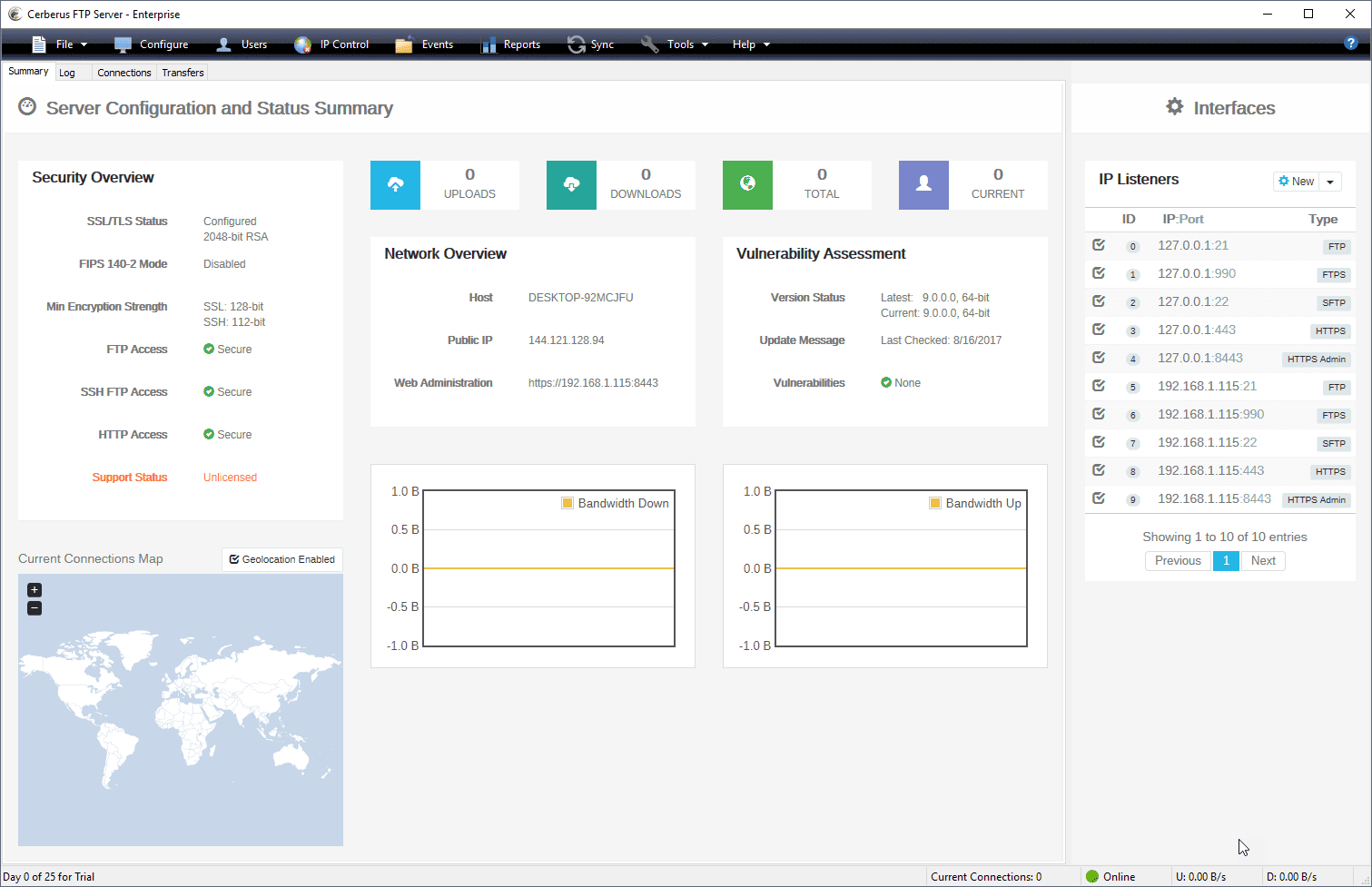
- Security: Added Protection against Intrusion. Configuration and Security Summary. Specify SSL ciphers to include or exclude. Restrict login by protocol. Password Policy Settings
- IP Whitelist and Blacklist, Automatic Account Lockout. Temporary User Accounts. AD FTP Security Groups, Certificate Revocation Lists (CRLs). Client Certificate Verification. SSH2 Public Key Authentication
- HIPAA Compliant, FIPS 140-2 Validated. Exceeds industry standards with FIPS 140-2. Also provides the necessary access controls to meet compliance regulations. Ensures data is protected from unauthorized access and logs all commands and file activity for auditing.
- Manage and authenticate user accounts from built-in users and groups, Active Directory, and LDAP, and control authentication order priority with the new authentication chaining control.
- Create custom Virtual Directories for individual Active Directory and LDAP users.
- Enhanced performance on Windows Server. Low memory utilization, native 64-bit, and full IPv6 support.
- Logging and Auditing. Rolling log files with configurable size limits, Syslog Integration, and detailed TLS/SSL cipher and bit strength per connection. Automatic logging of all commands and file access creates a complete audit trail.
- Detailed Statistics. Maintains statistical information about connections and file transfers. Allows creation of detailed reports of server usage.
- Superior Manageability. SOAP control API, Windows Service Support, and support for Microsoft’s Hyper-V and VMware’s ESX platforms.
- Maintain full access to the UI when running as a service
- Administrators can use the auto-blocking feature. It helps to prevent DoS (Denial of Service).
- IP Manager CIDR support
Cerberus FTP Server Other Features:
- Simultaneous FTP, SFTP, and FTPS for a single interface
- Custom Virtual Directories for individual Active Directory and LDAP users
- Require Secure Connections on a per-user basis
- Password Policy Settings
- Automatic Account Lockout
- IP Manager CIDR support
- Specify SSL ciphers to include or exclude
- Support for RSA, DSA, and Elliptic Curve public and private keys
- Support for Ephemeral Diffie-Hellman key exchange
- Block FXP and reserved ports for PASV connections
- Require Active Directory Security Group Membership
- UTF-8 – Display filenames in foreign languages with their native charset
- Taskbar icon control and status indicator
- Connections limit and timeout controls
- Transfer and connection statistics
- Hidden server mode (Hides server window)
- Fine-Grained Directory Access Restrictions
- IPv6 Support
Cerberus FTP Server – Pros & Cons
| Pros | Cons |
|---|---|
| ✓ Supports secure file transfer protocols, including SFTP, FTPS, HTTPS, and FTP, allowing organizations to protect data during transmission. | ✗ Advanced security, automation, and enterprise features require a commercial license, making it less suitable for users seeking a free solution. |
| ✓ Provides detailed user, group, and folder permission controls, making it easy to manage secure access for multiple users. | ✗ Initial configuration can be complex, especially when setting up secure protocols, certificates, and user permissions. |
| ✓ Includes web-based file transfer capabilities, enabling users to upload and download files through a browser without installing a dedicated client. | ✗ The Windows-focused design limits deployment flexibility compared to some cross-platform FTP server alternatives. |
| ✓ Includes automation features such as event triggers, notifications, and scripting to automate routine file management tasks. | ✗ Managing a large number of users and custom access rules may require ongoing administrative effort. |
| ✓ Delivers comprehensive logging, auditing, and reporting tools that help administrators monitor activity and meet compliance requirements. | ✗ Performance depends on proper server hardware, network configuration, and security settings, particularly in high-volume file transfer environments. |
Frequently Asked Questions
Is Cerberus FTP Server secure?
Yes. It supports encrypted transfer protocols such as SFTP, FTPS, and HTTPS, along with SSH2 public-key authentication, IP access controls, account lockout, certificate verification, and configurable security policies. It also provides logging and auditing features for monitoring file and account activity.
Does Cerberus FTP Server support Active Directory?
Yes. It can authenticate users and manage accounts through Active Directory and LDAP, as well as its built-in account system. Administrators can also create custom virtual directories for individual Active Directory and LDAP users.
Can Cerberus FTP Server be accessed through a web browser?
Yes. It provides an HTTPS web client that allows users to upload and download files through a browser without installing a dedicated FTP client. This can be useful when users need to access files from systems where installing additional software is impractical.
What is the difference between Cerberus FTP Server and Wing FTP Server?
Both are Windows-focused file transfer servers that support secure protocols and provide user management, access control, and monitoring features. Cerberus focuses on enterprise security, Active Directory and LDAP integration, compliance-oriented auditing, and Windows Server environments. Wing FTP Server, by comparison, offers a broader cross-platform deployment model and supports Windows, Linux, and macOS.
What’s New in Cerberus FTP Server 2026.3.1:
Release Date 2026-09-21
- Certificate signing request (CSR) generation fix: Previously, generating a new certificate signing request (CSR) from the TLS Server Key Pair dialog failed and displayed an “Unable to set certificate version” error. Now, you can successfully generate a new CSR from this dialog without encountering the version error.
- Web client locale fix: The web client’s file upload status messages and the Public Share OTP guest table (including pagination, empty-state, and entry-count text) always displayed in English, regardless of the configured locale. Now, these messages and tables correctly respect and display in your configured locale.
Official Homepage – https://www.cerberusftp.com
Supported Operating Systems:
- Windows Server 2025
- Windows Server 2022
- Windows Server 2019
- Windows Server 2016
- Windows 11, 10, 8, 7