Get Notified when the Software is Updated

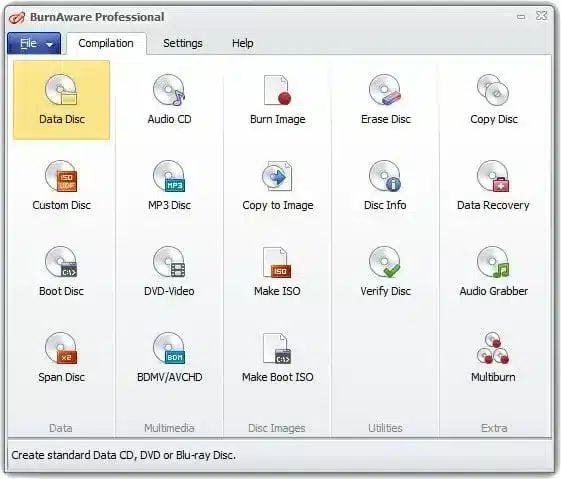
BurnAware offers a full-featured, free disc burning solution for creating all types of CD, DVD, and Blu-ray discs. Home users can easily create bootable discs, multisession discs, high-quality audio CDs, and video DVDs. The software also facilitates the creation, copying, and burning of disc images.
Power users will find significant value in BurnAware’s advanced options, which offer granular control over their burning projects. These features include comprehensive boot settings, UDF partition and management, ISO levels and restrictions, and precise session selection. Additionally, BurnAware supports CD text for tracks and discs, data recovery, disc spanning, and direct copying, ensuring a versatile and robust experience.
It supports a wide range of optical disc data storage, including CD, DVD, Blu-ray discs, double-layer discs, and rewritable and extra-large capacity Blu-ray media.
Beyond basic burning, the program provides essential tools for data disc burning, backup, disc verification, image creation, copying, erasing, data recovery, and audio track extraction, covering all your daily needs.
The software features a clean, intuitive, effective, and multilingual user interface that delivers an excellent user experience. Other great benefits are low CPU usage and a stable burning process.
In addition to standard burning options, BurnAware offers advanced features such as boot settings, UDF partition control, ISO level customization, session selection, CD-Text for track and disc information, byte-by-byte verification, direct disc copying, disc spanning, and more.
BurnAware Features:
- Burn your files to CD, DVD, or Blu-ray Discs
- Append or update Multisession discs
- Create a Bootable CD or DVD
- Copy the disc to an ISO image
- Create Audio CDs and MP3 discs
- Create DVD-Video and BDMV discs
- Make standard or boot disc images
- Copy CD, DVD, or Blu-ray Discs
- Erase or format a rewritable disc
- Burn data across multiple discs (disc spanning)
- Extract files from multi-session or corrupted discs
- Write ISO to multiple recorders simultaneously
Additional Features:
- Burns data across multiple CDs, DVDs, and Blu-ray discs
- Creates and burns standard/bootable Data CDs, DVDs, and Blu-ray discs
- Burns an ISO Image to multiple drives simultaneously
- Creates and burns Audio CDs, MP3 Discs, DVD-Videos, BDMV / AVCHD
- Creates standard/bootable ISO Images, burns various Disc Images
- Copies standard/multimedia CDs, DVDs, and Blu-ray to Disc Images
- Erases rewritable Discs, verifies Discs, and displays Disc / Drive details
- Copies from Disc to Disc, direct CD, DVD, Blu-ray copying
- Extract audio tracks in various formats from Audio CDs
- Recover files from unreadable Discs and separate sessions
- Usage in commercial organizations or for commercial purposes
BurnAware – Pros & Cons
| Pros | Cons |
|---|---|
| ✓ Burns data, audio, video, ISO images, and bootable discs to CDs, DVDs, Blu-ray, BDXL, and M-Disc media. | ✗ The Free edition lacks advanced features such as disc spanning, disc copying, and video conversion. |
| ✓ Clean, beginner-friendly interface that makes common disc burning tasks quick and easy. | ✗ Professional-only tools include data recovery, audio extraction, console burning, and multiburn support. |
| ✓ Supports disc verification, multisession discs, and ISO image creation for reliable backups. | ✗ Requires a compatible optical drive to burn or read CDs, DVDs, or Blu-ray discs. |
| ✓ Available in Free, Premium, and Professional editions to suit different user needs. | ✗ Disc burning speed and reliability depend on the quality of the optical drive and blank media. |
| ✓ Lightweight application with stable performance and regular updates for modern Windows systems. | ✗ Primarily designed for optical disc authoring and backups rather than modern cloud storage or file synchronization. |
Frequently Asked Questions
Can BurnAware create bootable discs?
Yes. It can create bootable CDs and DVDs, as well as standard or bootable ISO images. This makes it suitable for creating installation or recovery media from supported disc-image files.
Can BurnAware burn ISO files to multiple drives at the same time?
Yes. It can write an ISO image to multiple recorders simultaneously, which is useful when creating several identical discs in one operation.
Can BurnAware recover files from damaged CDs or DVDs?
Yes. It can extract files from multi-session or corrupted discs and recover files from unreadable discs and separate sessions. This feature can be particularly useful when trying to retrieve accessible data from problematic optical media.
What is the difference between BurnAware and ImgBurn?
Both support disc burning and ISO image operations, but BurnAware provides a more straightforward interface and a broader set of everyday disc-authoring tools. ImgBurn is known for offering more granular control over disc-image and burning operations, making it more appealing to users who need advanced configuration.
What’s New in BurnAware 19.4:
Release Date 2026-09-17
- Updated disc-burning SDK.
- Optimized file checking process.
- Improved DVD-Video encoding process.
- Improved handling of corrupted file timestamps.
- Resolved an issue that could cause infinite track closing.
- Resolved an issue with processing incorrect file dates.
Official Homepage – https://www.burnaware.com
Supported Operating Systems:
- Windows 7, 8, 8.1, 10, 11 (32-bit, 64-bit).