

Get Notified when the Software is Updated

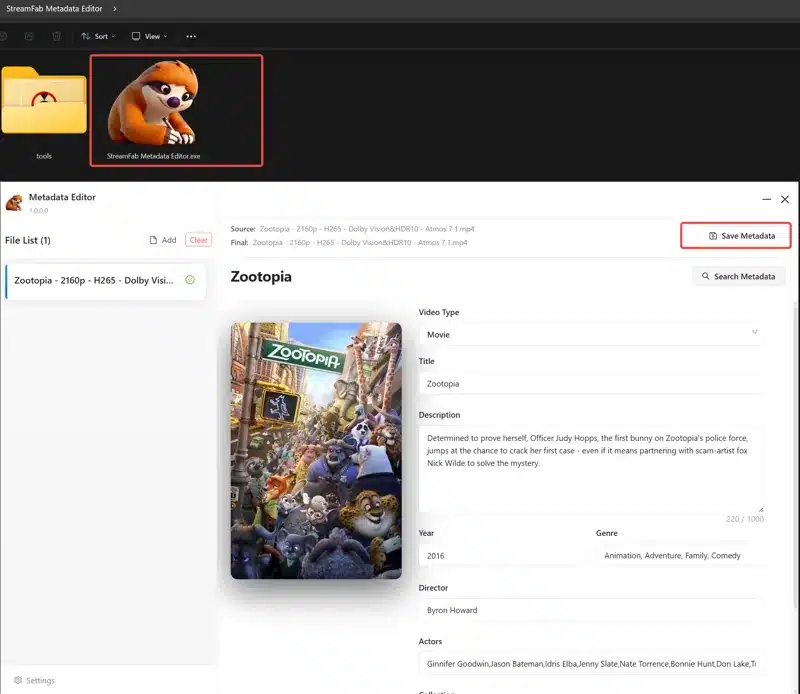
StreamFab Metadata Editor is a completely free tool for all StreamFab users to edit and organize their downloaded videos. Easily manage and improve metadata and cover art for local video files to keep your library organized and informative.
StreamFab’s built-in metadata editor automatically retrieves and saves media information, such as movie titles, cast, seasons, and episode details, during downloads from over 1,000 platforms, including Netflix and Amazon. This feature streamlines offline library organization for media servers such as Plex, Kodi, and PlayerFab.
Key Features:
- Automatically fetch video information from TMDB
- Edit video metadata and covers with ease
- Support for MKV and MP4 video formats
- Write metadata information directly into your video files
- Export NFO files for media server compatibility
- Format and rename video file names
- Light and dark theme styles
The metadata editor is integrated into the general StreamFab downloader and works alongside the tool’s ability to download 4K/8K content, enabling a structured, high-quality offline viewing experience.
- Support for searching TV shows from TVDB
- Support for batch saving metadata
- Support for organizing the video directory
- Support for monitoring StreamFab downloads or adding a custom directory
- Support for the Live Update feature
StreamFab Metadata Editor – Pros & Cons
| Pros | Cons |
|---|---|
| ✓ Automatically retrieves movie and TV metadata: StreamFab Metadata Editor can fetch titles, cast information, seasons, and episode details from online databases, reducing the effort required to organize a video collection manually. | ✗ Limited video format support: The listed supported formats are MKV and MP4, so users with videos in other formats may need to convert them before editing their metadata. |
| ✓ Supports direct metadata editing: Users can modify video information and cover art, helping keep movie and TV show libraries organized and visually consistent. | ✗ Available only for Windows: The supplied system requirements list Windows 10 and 11, with no native macOS or Linux version specified. |
| ✓ Writes metadata into video files: The editor can save metadata directly into supported video files, while NFO export helps integrate organized information with compatible media servers. | ✗ Focused on metadata rather than video editing: It organizes titles, descriptions, covers, and other media information but does not replace a full video editor for cutting clips, applying effects, or modifying footage. |
| ✓ Simplifies batch organization: Batch metadata saving, automatic download monitoring, custom directory support, and file renaming help manage larger collections more efficiently. | ✗ Automatic identification depends on online databases: Retrieving information from TMDB or TVDB may require manual corrections when titles are ambiguous, obscure, or incorrectly matched. |
| ✓ Available free of charge: The tool is offered as freeware to StreamFab users and includes useful features such as light and dark themes, metadata editing, and cover management without a separate editor fee. | ✗ End-to-end library management requires other tools: Although it can organize video files and export NFO information, users who need broader media-server features, such as streaming, playback management, or library sharing, will still need a compatible media server or player. |
Frequently Asked Questions
What is StreamFab Metadata Editor used for?
StreamFab Metadata Editor is a free tool for organizing downloaded videos by editing metadata, managing cover art, and keeping movie and TV show libraries organized.
Is StreamFab Metadata Editor free?
Yes. It is available free of charge to StreamFab users and does not require a separate editor license fee.
Which video formats does StreamFab Metadata Editor support?
It supports MKV and MP4 video files. Users can edit metadata and cover art, write information directly into video files, and export NFO files for compatible media servers.
Can StreamFab Metadata Editor automatically retrieve movie and TV show information?
Yes. It can retrieve information such as titles, cast, seasons, and episode details from online databases, including TMDB and TVDB, helping reduce manual library organization.
Does StreamFab Metadata Editor work with Plex and Kodi?
Yes. Its metadata organization features and NFO export support can help prepare video libraries for compatible media servers and players, including Plex and Kodi.
What’s New in StreamFab Metadata Editor 1.0.0.7:
- Fixed failures when saving video metadata on network drives and WSL paths.
Official Homepage – https://www.dvdfab.cn
Supported Operating Systems:
- Windows 10, 11 (32-bit, 64-bit)
Size: 59.4 MB
