

Get Notified when the Software is Updated

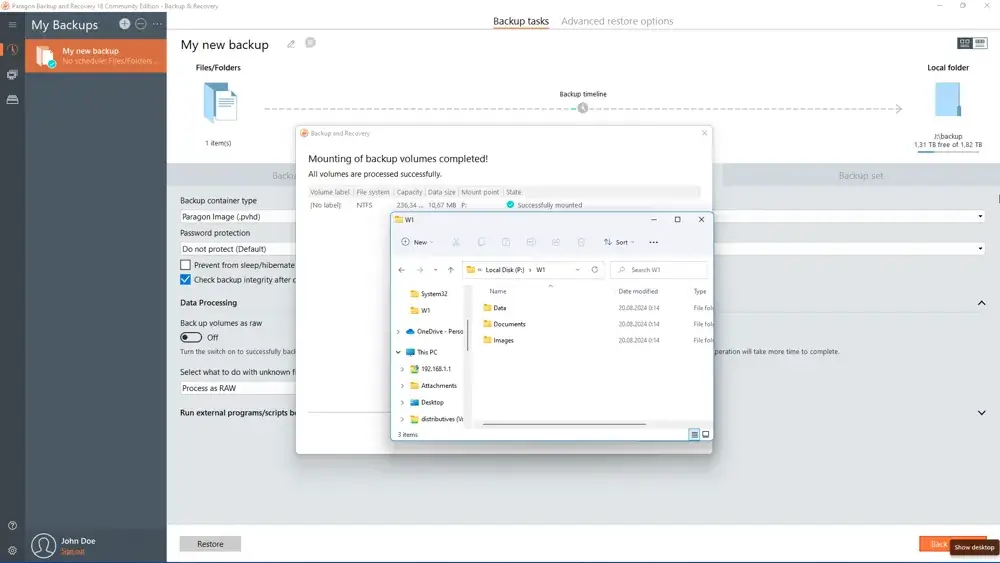
Paragon Backup & Recovery 18 Community Edition is a free and easy-to-use utility for creating reliable backups of an entire computer, individual volumes, or files. It is a backup solution with professional features. Create backups of individual files, partitions, or the entire Windows system quickly.
Paragon Backup & Recovery software helps you get consistent point-in-time copies of your PC. This can include the operating system, running applications, user settings, and all the data you want to keep. Three predefined backup strategies simplify the setup of regular backup routines.
Full backup images, followed by incremental backups of changed data since the last backup, combined with data retention, keep your data up to date while minimizing effort and backup storage requirements. Backup data can be stored on a local or external device or a network share.
Paragon Backup & Recovery offers several restore options to help you recover from an emergency as quickly as possible. These range from quickly restoring specific files from a backup image to restoring your entire computer to an earlier state without losing data or having to reinstall and reconfigure your programs.
Key Features of Paragon Backup & Recovery 18 Community Edition:
Disk Backup
Save not only all data stored on the disk but also the system service structures. It is ideal for creating a backup image of an entire hard disk, including GPT disks or system partitions, to ensure the operating system remains fully functional.
Differential Backup
Create a sector-based backup image that archives only the changes made since the last full backup, significantly reducing backup storage requirements. To restore this kind of backup, you will require a full image and one of its differentials.
Incremental Backup
The most space-saving backup approach! Unlike differential backups, it stores not only the data changed since the full sector-based backup was created but also changes recorded in one of its incremental backups.
Backup Jobs
Choose from our predefined backup strategies and automate PC backups with just a few clicks. There is no easier way to protect your entire system, individual partitions, or specific files.
Flexible Restore
- Restore an entire disk, separate partitions, or only files you need from the previously created backup image.
- Restore with Shrink to restore a backup amount of actual data from the image.
- Create a bootable USB Flash drive, CD, or DVD to recover your PC on demand
- Restore entire hard disks, separate partitions, or certain files and folders from pVHD (available under Windows and Linux)
- Restore the contents of a 512-byte hard disk to a 4K hard disk with no additional actions
WinPE-based Recovery Environment
You can create a fully functional Windows-based recovery environment and store it on bootable media, such as a CD or USB flash drive. The recovery media lets you boot your computer for maintenance or recovery, even if the operating system is corrupted or unusable.
With the Paragon Backup & Recovery 18 Community Edition recovery environment, you can, for example, recover your Windows system, fix boot problems, or restore a backup image.
Paragon Backup & Recovery – Pros & Cons
| Pros | Cons |
|---|---|
| ✓ Protects your entire system, selected partitions, or individual files with flexible backup options. | ✗ Several advanced backup and recovery tools are available only in the commercial edition. |
| ✓ Lets you schedule automatic backups to reduce the risk of data loss. | ✗ The software does not include built-in cloud backup integration with services such as Google Drive or OneDrive. |
| ✓ Supports incremental and differential backups to save both storage space and backup time. | ✗ Licensed for personal, non-commercial use only. |
| ✓ Offers backup compression and encryption for improved storage efficiency and security. | ✗ The software is available exclusively for Windows and cannot be installed on macOS or Linux. |
| ✓ Available free for personal use, making reliable backup accessible without extra cost. | ✗ Creating and restoring large backups can take considerable time, depending on the storage device and system performance. |
Frequently Asked Questions
Is Paragon Backup & Recovery free to use?
Yes. The Community Edition is free for personal, non-commercial use. Advanced backup and recovery tools are available in Paragon’s commercial editions.
What is the difference between Paragon Backup & Recovery and AOMEI Backupper?
Both are Windows backup utilities that can automate backups and protect files or system data. Paragon Backup & Recovery emphasizes full, differential, and incremental backups, flexible restoration, and WinPE-based recovery, while AOMEI Backupper provides its own set of backup, restore, and disk-management features.
Can Paragon Backup & Recovery restore Windows if it will not boot?
Yes. Its WinPE-based recovery environment can boot from recovery media even when Windows is corrupted or unusable. You can then use the environment to recover the Windows system, fix boot problems, or restore a backup image.
Can Paragon Backup & Recovery back up to an external hard drive?
Yes. Backup data can be stored on an external device, and the requirements specifically list an external USB hard drive as a supported storage option.
Official Homepage – https://www.paragon-software.com
Supported Operating Systems:
- Windows 11 ARM64 editions
- Windows 10 x64 (1809 and newer), Windows 11 x64
Supported Computer Bus Interfaces
- Parallel ATA
- SATA
- External SATA
- All levels of SCSI, IDE, and SATA RAID controllers
- SCSI
- USB
- IEEE 1394
- All types of RAID (hardware and software)
- PC or PCMCIA Card (Personal Computer Memory Card International Association)
Supported Storage
- Storage Spaces Support
- AFD (Advanced Format Drive)
- Non-512B sector size drives
- SSD and HDD
- Any common optical disk device
Supported File Systems
- NTFS
- FAT32
- Ext2 and newer
- ReiserFS 3
- Linux Swap
- HPFS (Only view. All other operations in 1:1 mode)
- Apple HFS+
- B-tree FS (Btrfs)
- Extents FS (XFS)
Hardware Requirements
- Intel Pentium CPU or its equivalent, with a 1000 MHz processor clock speed
- 1 GB+ RAM
- Internet Explorer 10 or higher
- Hard Disk Drive with 250 MB of available space
- SVGA video adapter and monitor
- Open ports in Firewall: inbound and outbound 80, 443
- WinPE-based Recovery CD
Additional Requirements
- Network card to send/retrieve data to/from a network computer (internet connection)
- Recordable CD/DVD drive to burn data to compact discs
- External USB hard drive to store data
