Get Notified when the Software is Updated

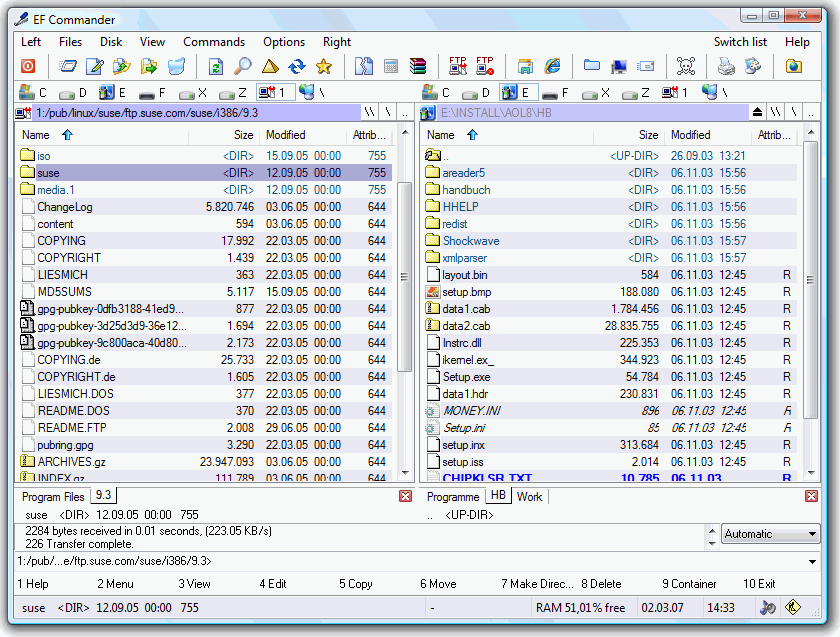
EF Commander is an easy-to-use yet sophisticated and feature-rich file manager designed to meet the needs of users ranging from beginners to professionals. It was developed in response to frequent user requests and has evolved into a powerful Windows file manager for both novice and advanced users.
If you’ve ever used and liked Norton Commander, you’ll like this dual-windowed program, complete with bubble and online help. Directory trees and folders can be searched, and actions such as Run can be performed on files.
EF Commander is also a file archiver, viewer, and FTP client. It’s compatible with Windows desktop and server editions from Windows 95 to Windows 11.
You can check file attributes, perform search-and-replace operations, and manage files efficiently using drag-and-drop. Use the internal editor or set your preferred external editor for editing tasks. Easily view files and customize the interface buttons to match your workflow. With a single click, system and disk information is accessible, and EF Commander provides a versatile Windows file manager with built-in editing and system tools.
EF Commander features:
- Easy to use. The modern interface gives you complete control over your files and folders.
- Tabbed interface. Define only the views you need for each pane to manage your folders and files.
- Built-in media player. EF Commander features a high-quality, full-featured audio player with a playlist and ID3 tag support. It supports efficient playback of MP3, Ogg/Vorbis, FLAC, WMA, and WAV files with low system resource usage.
- Multi-rename tool — A versatile function for easily renaming multiple files in a single processing step. It uses a flexible system for defining renaming rules, including options for MP3 files and EXIF data.
- Thumbnails. Quickly and easily get an overview of your photos or other image collections.
- Parallel file operations. The system supports multitasking for long operations, so multiple tasks or duplicate operations, such as copy commands, can run in parallel.
- Direct link to PDAs with Windows CE. As the first file manager to offer this feature, EF Commander lets you work with your data the same way you do on a desktop or laptop computer.
Additional features:
- Burn CDs and DVDs directly from EF Commander. Nero Burning ROM is required.
- Internal packers for more than 20 archive formats. With EF Commander, you can easily compress files or entire folders into a wide range of archive formats — all without requiring external software. Supported formats include 7-Zip, ACE, ARC, ARJ, BZIP2, CAB, CPIO, GZIP, IMG, ISO (ISO9660), LHA, RAR, RPM, SFX, SQX, TAR, TBZ, TGZ, ZIP, Zip64, and ZOO.
- Internal viewer for more than 30 file formats. View images and videos, and play audio in MP3, Ogg/Vorbis, FLAC, WMA, and WAV formats without requiring additional software.
- Use XnView and IrfanView as add-ons. Enlarge the number of available formats to 400 or more. EF Commander works quietly in the background while offering file management through its internal viewer, Quick View, or thumbnail previews.
- Fast FTP/FTPS client. The built-in FTP client features resume download capabilities, FxP (server-to-server transfers), and FTPS secure connections (SSL/TLS).
- Internal text and HEX editor. EF Commander includes full-featured text and hex editors for files, limited only by your system’s available resources.
- Functions to split/join large files. Split large files into smaller parts and easily recombine them when needed.
- Create and verify checksums to ensure data integrity. EF Commander supports SFV, MD5, SHA-1, SHA-256, and SHA-512 formats.
- Synchronize function. Synchronize your notebook or your LAN with your workstation.
- External plug-in support for packers, viewers, file systems, and contents. Supported formats include WLX, WCX, WFX, and Winamp decode plugins.
The first was written in 1994 for the OS/2 operating system, using Presentation Manager, as a personal replacement for the DOS-based Norton Commander. In 1996, it was ported to the 32-bit Microsoft Windows operating system.
EF Commander – Pros & Cons
| Pros | Cons |
|---|---|
| ✓ Combines dual-pane file management with built-in archive, viewer, editor, FTP, and synchronization tools in one application. | ✗ The large number of built-in tools and advanced file-management options may take time for new users to learn. |
| ✓ Supports more than 20 archive formats and more than 30 file formats through its internal packers and viewer. | ✗ CD and DVD burning requires Nero Burning ROM, so this functionality depends on additional software. |
| ✓ Includes a secure FTPS client with SSL/TLS, resume downloads, and server-to-server FxP transfers. | ✗ Some file-format support depends on optional add-ons such as XnView and IrfanView, particularly when expanding viewing capabilities. |
| ✓ Provides useful file-management utilities such as multi-file renaming, checksum verification, file splitting/joining, synchronization, and parallel file operations. | ✗ The software is Windows-only, with no native macOS or Linux version listed in the supported operating systems. |
| ✓ Offers extensive Windows compatibility, including modern Windows versions as well as legacy releases, with both x86, x64, and portable editions available. | ✗ Its dual-pane, feature-rich design may be more functionality than users need if they only require basic Windows file browsing and copying. |
Frequently Asked Questions
Is EF Commander free to use?
The article does not provide enough information to confirm whether EF Commander is free, so I would not use this FAQ unless you verify its current licensing terms separately.
Does EF Commander have a portable version?
Yes. Portable editions are available for both Windows x86 and x64, allowing you to run the file manager without using the standard installation package. The download section also lists a portable U3 edition.
Can EF Commander open RAR and ZIP files?
Yes. Its internal packers support more than 20 archive formats, including RAR, ZIP, 7-Zip, CAB, TAR, GZIP, BZIP2, ISO, and others. This allows you to work with many common archives directly from the file manager.
What is the difference between EF Commander and Total Commander?
Both are dual-pane Windows file managers that provide tools for managing files, folders, archives, and FTP connections. EF Commander includes features such as a built-in media player, support for more than 20 archive formats, checksum tools, file splitting, and synchronization. In contrast, Total Commander is known for its extensive plugin ecosystem and file-management capabilities.
Official Homepage – https://www.efsoftware.com
Supported Languages:
English, German, Bulgarian, Catalan, Chinese, Croatian, Czech, Danish, Dutch, French, Galician, Hungarian, Italian, Japanese, Korean, Latvian, Lithuanian, Macedonian, Polish, Portuguese, Romanian, Russian, Slovak, Spanish, Swedish, Taiwanese, Ukrainian.
Supported Operating Systems:
- Windows 11
- Windows 10
- Windows 8 / 8.1
- Windows 7
- Windows Vista
- Windows XP
- Windows Server (all versions)
- Windows Media Center Edition
- Windows 2000
- Windows NT 4
- Windows ME
- Windows 98
- Windows 95