

Get Notified when the Software is Updated

mp3DirectCut is a fast and feature-rich audio editor and recorder designed specifically for compressed MP3 files. It allows you to cut, copy, paste, or adjust volume levels directly, without re-encoding the audio. This preserves the original sound quality and ensures no loss during editing. The highly efficient software gives you precise control over your MP3 audio tracks.
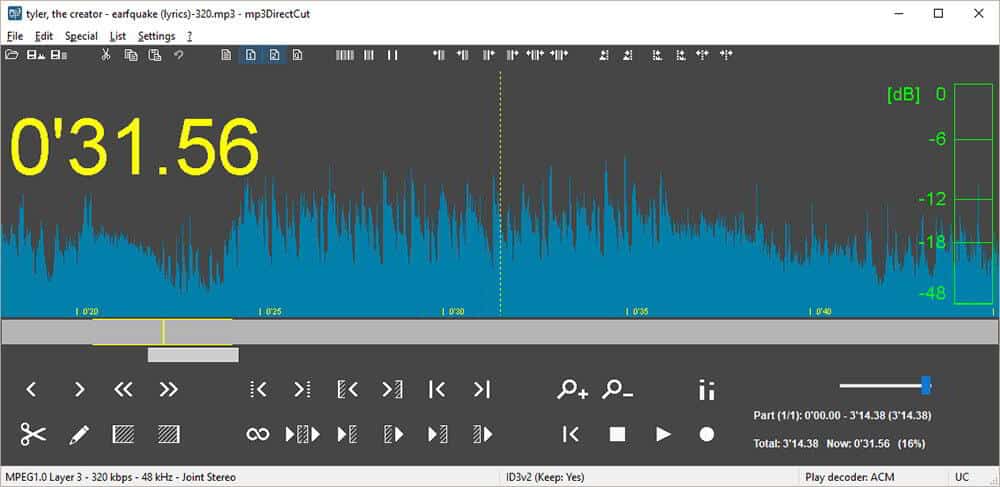
The program offers easy navigation, even with large MP3 files, and shows a visual layout of the MP3 and the audio data. It supports Cue Sheets, allowing you to split tracks at predefined cue points. You can also record audio directly from an input device and encode it as an MP3 in real time. The built-in recorder captures and creates MP3 files on the fly from your audio source.
You can remove sections, adjust volume levels, split tracks, or copy segments into new files — all without decompressing your MP3 into PCM format. This reduces editing time and disk space usage while preserving the original audio quality.
mp3DirectCut is a frame-based editor for MPEG audio files (Layers 2 and 3). It lets users trim audio from CD rips or directly recorded MP3s from vinyl or tape. Favorite songs can be extracted from long MP3 radio or live recordings, using multiple cuts and precise fade effects.
mp3DirectCut Features:
- Non-destructive cut, copy, paste
- Volume change, fade, normalize
- MP3 recording with ACM or Lame encoder
- Fast MPEG visualisation and easy navigation
- Layer 2 support (DVD/DVB audio)
- AAC support
- Batch processing
- Cue Sheet support
- Pause detection
- Auto cue (track dividing by time values)
- Track splitting with filename and tag creation
- Trim Crop Fast play · Loop play
- ID3v1.1 tag editor < ID3v2 tag keeping
- VU meter · bitrate visualization
- High-speed recorder · Command line usage
- Unicode support
mp3DirectCut – Pros & Cons
| Pros | Cons |
|---|---|
| ✓ Edits MP3 files without re-encoding, allowing users to cut, copy, paste, and trim audio while preserving the original compressed audio data. | ✗ Primarily targets MPEG audio editing, so users who need a general-purpose editor for extensive multitrack production or a wide range of audio formats may need another application. |
| ✓ Includes volume adjustment, normalization, and fade effects, making it useful for cleaning up recordings and preparing audio clips without a separate editing application. | ✗ AAC playback and editing require the separate 32-bit libfaad2.dll library, adding a setup step for users working with AAC files. |
| ✓ Records audio directly from an input device and encodes it as MP3 in real time, supporting workflows such as capturing audio from vinyl records, tapes, or other audio sources. | ✗ MP3 recording requires a compatible ACM or LAME encoder DLL, so recording functionality depends on the necessary encoding component being available. |
| ✓ Supports batch processing, cue sheets, pause detection, and automatic track splitting, helping users divide long recordings into individual tracks with filenames and tags. | ✗ MP4 demuxing requires the separate ffmpeg.exe utility, which must be available for that workflow. |
| ✓ Uses a compact installation and provides visual audio navigation, frame-based editing, and fast playback controls, making it practical for trimming large MP3 recordings without a bulky editing suite. | ✗ Linux users need to run the program through Wine rather than using a native Linux application, which adds a compatibility layer to the setup. |
Frequently Asked Questions
How do you join multiple audio files with mp3DirectCut?
Open the audio files or drag them into the program, then append compatible tracks to the current recording. The files must have matching audio parameters, including format type, sample rate, stereo mode, and CRC, before you save the combined audio.
Can mp3DirectCut edit AAC files?
Yes, mp3DirectCut supports AAC editing, but it requires the separate 32-bit libfaad2.dll library. Editing audio from MP4 files also requires FFmpeg to extract the AAC audio stream, and the program cannot package the edited audio back into an MP4 file.
Can mp3DirectCut record audio directly to MP3?
Yes, its built-in recorder captures audio from an input source and encodes it directly as an MP3 file. Recording requires a compatible ACM or LAME encoder DLL, so you may need to configure the appropriate component first.
Can mp3DirectCut run on Linux?
Yes, mp3DirectCut can run on Linux through Wine, a compatibility layer for Windows applications. The supplied requirements do not list a native Linux version, so you need Wine to use the Windows application on Linux.
What is the difference between mp3DirectCut and Audacity?
mp3DirectCut specializes in editing compressed MP3 and AAC files directly, making it useful for cutting, splitting, and joining audio without re-encoding. Audacity is a broader audio editor and recorder with multitrack editing, effects, noise reduction, and support for formats such as WAV, FLAC, and MP3. Choose mp3DirectCut for quick, quality-preserving MP3 edits or Audacity for more extensive audio production.
What’s New in mp3DirectCut 2.40:
Release Date 2026-03-29
- New installer (own SFX)
- Binary changes (gcc build)
- Select from beginning / to end shortcut
- Better dark mode menu item width
- The wrong task priority checkbox has been fixed
- Large buttons fit on low DPI
- Scrolling over 2 GB did not work
- Language detection on first start
- Minor adaptations and corrections
Official Homepage – https://mpesch3.de
Requirements:
- Windows or Linux with Wine
- For MP3 play/cut: MP3 ACM codec (present in Windows) or mpglib.dll
- For AAC play/cut: libfaad2.dll (32-bit)
- For MP3 recording: encoding ACM or Lame encoder DLL (32-bit)
- For MP4 demuxing: ffmpeg.exe
Size: 374 KB
