Get Notified when the Software is Updated

Avidemux is a freeware, open-source video editor designed for multi-purpose video editing, converting, simple cutting, resizing, filtering, and encoding tasks.
It supports many file types, including AVI, MP4, Matroska, MPEG-2, H.264, and H.265. It does not yet, or only partially, support modern open formats, such as Opus, WebM, VP8, VP9, and AV1. Tasks can be automated using projects, job queues, and powerful scripting capabilities.
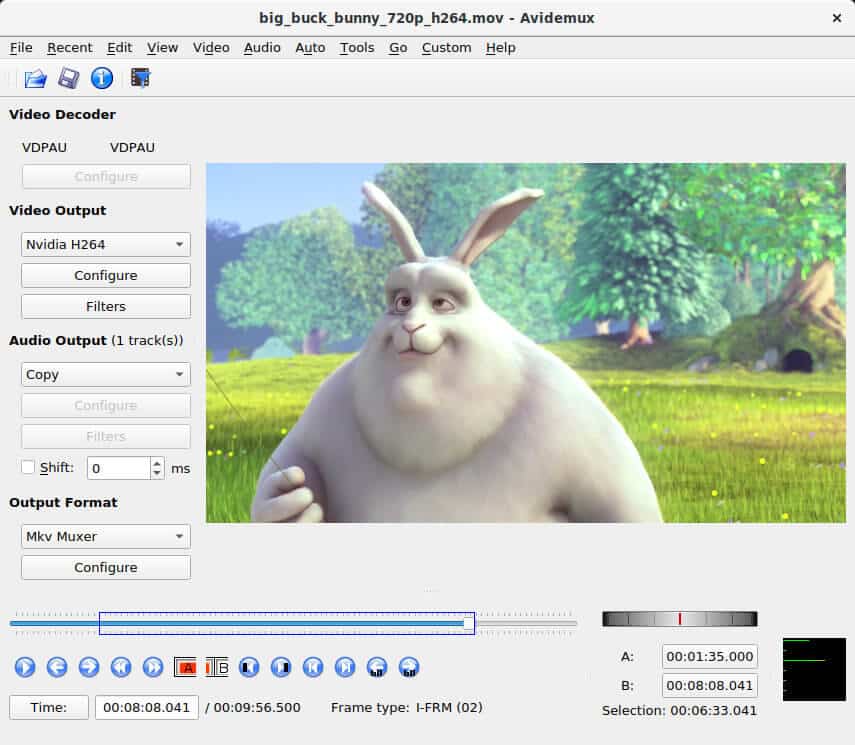
Avidemux lets you edit most video files and optimize them for playback on compatible devices. Multi-threading is supported! The graphical user interface of Avidemux looks similar to VirtualDub. Most features found in VirtualDub are also available, along with native support for popular file formats such as AVI, MKV, MPEG, VOB, MP4, TS, ASF, OGM, and FLV.
Avidemux cannot open raw MPEG streams. Instead, it can open indexed MPEG streams. The index is a text file containing navigation information. It is needed to allow frame accuracy.
As for MPEG streams, a NuppelVideo file has no internal index. Avidemux automatically rebuilds it when the file is loaded, which may take a few minutes.
Avidemux can also open a stream of uncompressed BMP files (RGB), a set of JPEG files, or a set of PNG files. The latest version of Avidemux can usually decode WMV and ASF containers, although some files may still fail to open or play properly. If you have that problem, you can place the WMV contents into an AVI container.
Multithreading
Multithreading has been applied within the following areas of Avidemux (some partially by libavcodec):
- Encoding
- MPEG-1 and MPEG-2 (utilizing libavcodec)
- MPEG-4 Part 2 SP/ASP (utilizing libavcodec or Xvid)
- Earlier versions of Xvid are usually not compatible with this feature.
- H.264/MPEG-4 Part 10 AVC (utilizing x264)
- H.265/HEVC (utilizing x265)
- Decoding
- MPEG-1 and MPEG-2 (utilizing libavcodec)
- MPEG-4 Part 2 SP/ASP (utilizing libavcodec)
Avidemux – Pros & Cons
| Pros | Cons |
|---|---|
| ✓ Free and open-source video editor that supports a wide range of video, audio, and subtitle formats for editing and conversion. | ✗ The interface is designed for functionality rather than modern aesthetics, which can feel outdated to new users. |
| ✓ Offers precise frame-by-frame editing, making it easy to trim, cut, and process videos without unnecessary re-encoding when supported. | ✗ Lacks advanced timeline editing, motion graphics, and multi-track capabilities found in professional video editing software. |
| ✓ Includes numerous built-in filters for color correction, sharpening, deinterlacing, resizing, noise reduction, and other video enhancements. | ✗ Some filters and encoding settings require technical knowledge to achieve the best output quality. |
| ✓ Supports scripting and job automation for efficient batch processing of multiple videos. | ✗ Processing large or high-resolution videos can be time-consuming on systems without powerful hardware acceleration. |
| ✓ Available for Windows, macOS, and Linux, providing a consistent editing experience across major desktop platforms. | ✗ Stability may vary with certain codecs or plugins, occasionally requiring users to adjust settings or update components for optimal compatibility. |
Frequently Asked Questions
Can Avidemux edit videos without re-encoding them?
Yes. When the source and output formats are compatible, it can save edited videos without re-encoding, making trimming and cutting much faster while preserving the original video quality. Some editing operations or format changes still require re-encoding.
What is the difference between Avidemux and Shotcut?
Avidemux is designed for simple video editing, cutting, filtering, encoding, and format conversion. Shotcut is a full-featured, non-linear video editor with a multi-track timeline, advanced effects, transitions, and broader editing capabilities for more complex projects.
Can Avidemux add subtitles to videos?
Yes. Supports adding subtitle files to videos through built-in subtitle filters during encoding. It can also work with several common subtitle formats, depending on the selected filter.
Does Avidemux support batch video processing?
Yes. It includes job queues and scripting capabilities that allow multiple videos to be processed automatically. Ideal for applying the same conversion or editing tasks to multiple files at once.
What’s New in Avidemux 2.8.1:
Release Date 2022-09-23
New Features
- New HiDPI compatible button set
- A fast method to add partial filters via the CTRL+F shortcut
- Audio department improvements
- custom frame rate change (audio stretch with pitch control)
- configurable compressor (DRC)
- 3-band equalizer
- independent channel gain options
- independent channel delay options
- channel remap options
- new downmix options: stereo headphones and headphone virtual surround
- audio track configuration up to 32 tracks
- The volume setting is saved upon exit
- Light and dark theme options in the View menu
- Option to remember selected resize method in “Resize”, “Fit size,” and “Zoom” filters
- New filter: 3D LUT
- New filter: Decimate
- New filter: Arbitrary Rotate
- New video encoder: VideoToolbox HEVC (“ffVTEncHEVC”, macOS only)
Other Enhancements
- HDR tonemapping performance and quality improvements
- Extended file info
- Scrolling the mouse wheel over the 60-second seek buttons cycles through 1-, 2-, 4-, and 60-second seek intervals.
- Support for decoding 8-bit VP9 in hardware via DXVA2 on Windows and VDPAU on Linux with graphics cards featuring a VP9 decoder
- Adds buttons for selecting the start (A) and end (B) points while previewing video filters in real time.
- The logo image in the “Add logo” video filter configuration dialog is now scalable and can be repositioned by dragging.
- By default, on-the-fly preview in video filter configuration dialogs is now rendered using OpenGL to improve performance in HiDPI conditions.
Bugfixes
- Crash on copy to clipboard if selection extends to the end of video, a regression introduced in v2.8.0
- Crashes in “Resample FPS” video filter with motion interpolation enabled
- Crash on finishing encoding with the vp9 encoder
- Avidemux may crash during startup on Linux with some recent hardware due to a bug in the VA-API driver triggered during hardware probing.
- Crash loading MPEG-TS or MPEG-PS file with MPEG-1 video track and HW decoder via VDPAU enabled
- Wrong number of channels or wrong channel layout with some E-AC3 streams
- Reduced contrast and desaturated colors in loaded BMP images
- Selection starting at zero and ending at the last picture of the video cannot be deleted
- Disabling B-frames breaks the VideoToolbox HW encoder (macOS only)
Miscellaneous
- The bundled FFmpeg libraries have been updated to version 4.4.2.
Official Homepage – https://avidemux.sourceforge.net
Avidemux can be used on almost all known operating systems and computer platforms. Avidemux is available for Linux, BSD, macOS, and Microsoft Windows under the GNU GPL license.