Get Notified when the Software is Updated

Hiren’s BootCD PE (Preinstallation Environment) is built for modern computers as a reliable emergency boot disk. It is built on Windows 11 PE x64, supports UEFI boot mode, and requires at least 4 GB of RAM for stable performance on modern systems.
This tool proves useful in many situations, including system analysis, recovery, and repair, even when the primary operating system fails to boot properly. It gives direct access to essential utilities without relying on an installed OS.
After startup, Hiren’s BootCD PE automatically detects and installs common hardware drivers like graphics, sound, wireless, and Ethernet adapters. This ensures quick network access through WiFi or wired connections during troubleshooting sessions.
Hiren’s BootCD PE supports UEFI booting from both DVD and USB flash drives, offering flexible boot options for modern and legacy recovery workflows.
The included USB2ISO portable tool helps format or repartition USB drives and correctly transfer ISO contents to the device. Administrator privileges are needed to operate this utility and prepare a bootable USB drive.
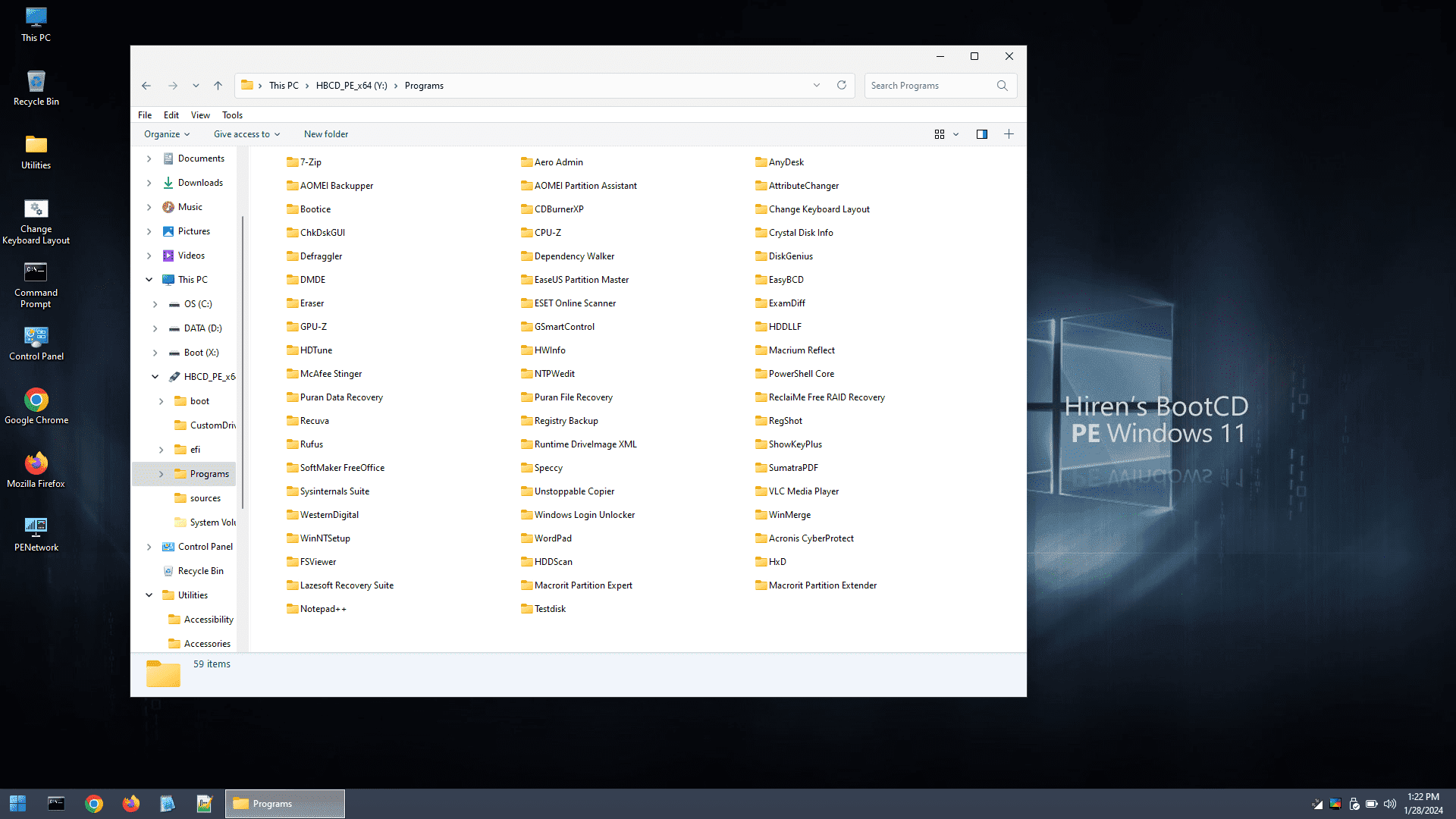
Hiren’s BootCD includes a comprehensive collection of tools organized into categories such as partition management, backup, recovery, and BIOS/CMOS utilities. This structured layout makes it easier to locate the right tool for each task.
With a basic understanding of the included tools, you can resolve many common PC issues, including hard drive failures, malware infections, partition errors, password recovery, and critical data recovery scenarios.
Hiren’s BootCD PE – All-in-One Bootable CD that has all these utilities:
Antivirus Tools, File Compressing Tools, Hard Disk Tools, Backup and Data Recovery Tools, Defragmenting Tools, Partition Tools, BIOS / CMOS Tools, Browsers, File Managers, Cleaners, File Systems Tools, MBR (Master Boot Record) Tools, Network Tools, Optimizers, Password Tools, Process Tools, Recovery Tools, Registry Tools, Remote Control Tools, Encryption Tools, System Information Tools, Testing Tools, Tweakers, etc.
BCD-MBR Tools
- BootIce v1.3.3
- EasyBCD v2.3
Hard Disk Tools – Data Recovery
- CheckDisk GUI v0.3.1
- Lazesoft Data Recovery v4.7
- Puran Data Recovery v1.2.1
- Puran File Recovery v1.2.1
- Recuva v1.53.2096
- DMDE v4.0.6
- ReclaiMe build 4571
- PhotoRec v7.2
- Unstoppable Copier v5.2
- Victoria v5.37
- DiskInternals Linux Reader v4.19.2
- Paragon AppleFS for Windows v2.1.12
Hard Disk Tools – Defrag
Hard Disk Tools – Diagnostic
- GSmartControl v1.1.4
- HDDScan v4.1
- HDTune v2.55
- WD Data Lifeguard Diagnostics v1.37
- Crystal Disk Info v9.2.2
- Test Disk v7.2
Hard Disk Tools – Imaging
- Acronis Cyber Protect b40901
- AOMEI Backupper v7.3.3
- Lazesoft Disk Image & Clone v4.7
- Macrium Reflect PE v7.3.5925
- Runtime DriveImage XML v2.60
- Drive Snapshot v1.50
Hard Disk Tools – Partition Tools
- AOMEI Partition Assistant v10.2.2
- Macrorit Partition Extender v2.3.1
- Macrorit Partition Expert v8.1.3
- DiskGenius v5.5.1.1508
- EaseUS Partition Master v14.5
Hard Disk Tools – Security
- HDD Low-Level Format Tool v4.40
- Eraser v6.2.0.2993
- VeraCrypt v1.26.7
Windows Recovery
- Lazesoft Windows Recovery v4.7
Other Tools
- FSViewer v7.8
- Free Office rev 703
- Sumatra PDF v3.5.2
- 7-Zip v23.01
- ExamDiff Pro v1.9.3
- HxD v2.5.0
- Notepad++ v8.6.2
- WinMerge v2.16.36
- VLC Media Player v3.0.20
- TreeSize v4.7.1.525
- IrfanView v4.62
- NVDA v2023.3.3 (Ctrl + Alt + N)
Removable Drive Tools
- CDBurnerXP v4.5.8.7128
- Rufus v4.4
- ImageUSB v1.5.1006
Security – AntiVirus
- ESET Online Scanner v3.5.6
- McAfee Stinger v13.0.0.19
Security – KeyFinders
- ShowKeyPlus v1.0.7060
Security – Passwords
- Lazesoft Password Recovery v4.7
- NT Password Edit v0.7
- Windows Login Unlocker v2.1
System Tools
- CPU-Z v2.09
- GPU-Z v2.57
- HWInfo v7.68-5300
- Speccy v1.32.803
- WinNTSetup v5.3.3
- Attribute Changer v11.0
- Change Keyboard Layout v1.0.0
- Dependency Walker v2.2.6
- Registry Backup v4.0.0
- Regshot v2.0.1.70
- SysInternals Suite
- PowerShell Core v7.4.1
- Aqua Key Test
- ImDisk Virtual Disk Driver v2.0.9
- Total Commander v11.02
Network
- Aero Admin v4.7
- Google Chrome v121.0.6167.185
- Mozilla Firefox Quantum ESR v115.3.1esr
- PENetwork v0.59.0.B12
- Anydesk 7.1.13
- WinSCP v6.1.2
- Putty v0.80
Hiren’s BootCD PE does not contain any pirated software. It is 100% free of charge, legal, and permitted for commercial and non-commercial use.
Hiren’s BootCD PE – Pros & Cons
| Pros | Cons |
|---|---|
| ✓ Boots directly from a USB drive or DVD, allowing you to troubleshoot computers without starting Windows. | ✗ Intended primarily for troubleshooting and recovery rather than everyday Windows use. |
| ✓ Includes a comprehensive collection of system recovery, disk management, backup, password reset, and diagnostic utilities. | ✗ Some included utilities may require technical knowledge to use safely and effectively. |
| ✓ Helps recover lost files, repair boot problems, remove malware, and troubleshoot Windows startup issues. | ✗ Certain tools can change disk partitions, boot records, or system settings. Improper use may result in data loss. |
| ✓ Supports modern hardware and provides a familiar Windows PE environment for easier system maintenance. | ✗ Creating and booting the recovery media requires access to a USB drive or DVD and compatible BIOS/UEFI settings. |
| ✓ Completely free for personal use and widely trusted by technicians, IT professionals, and advanced users. | ✗ Some third-party tools included with the PE edition may have their own licensing terms or usage restrictions. |
Frequently Asked Questions
Does Hiren’s BootCD PE work with Windows 11?
Yes. The PE environment is built on Windows 11 PE x64 and is designed for modern computers with UEFI boot support. It requires at least 4 GB of RAM for stable operation.
How do you create a bootable USB with Hiren’s BootCD PE?
You can use the included USB2ISO utility to prepare a USB drive and transfer the ISO contents correctly. Administrator privileges are required, and the computer must be configured to boot from USB when starting the recovery environment.
Can Hiren’s BootCD PE recover deleted files?
Yes. It includes several data-recovery utilities, including Recuva, PhotoRec, Puran File Recovery, DMDE, and Lazesoft Data Recovery. These tools can help recover lost or deleted files, although successful recovery depends on the condition of the storage device and whether the original data has been overwritten.
What is the difference between Hiren’s BootCD PE and MediCat USB?
Both provide bootable Windows-based environments containing numerous troubleshooting and recovery utilities. Hiren’s BootCD PE is built around a Windows 11 PE x64 environment and provides a focused collection of system-repair, recovery, security, and diagnostic tools, while MediCat USB is a larger multi-tool rescue environment that combines Windows PE with additional bootable utilities and operating systems.
What’s New in Hiren’s BootCD PE x64 v1.0.8:
- The outdated “bhtpcrdr.sys” driver for the “O2Micro CardReader” hardware has been removed and updated with the latest version. This hardware (commonly found in Dell laptops) was causing BSOD errors due to the outdated driver. The issue has been resolved.
- The outdated driver for the “Linksys WUSB600N Wireless-N USB Adapter with Dual-Band ver. 2” hardware was causing BSOD errors. The driver has been updated, and the issue has been resolved.
Official Homepage – https://www.hirensbootcd.org