

Get Notified when the Software is Updated

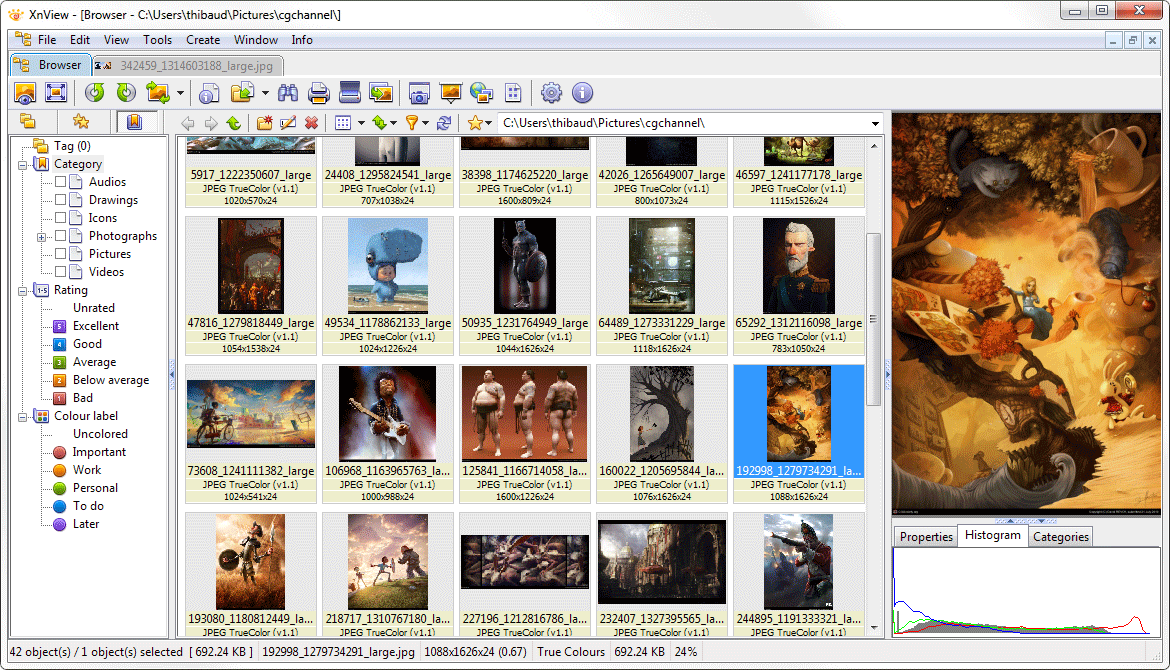
XnView is an efficient multimedia viewer, browser, and converter. It is easy to use and supports reading approximately 500 formats, including multi-page and animated still formats such as APNG, TIFF, GIF, and ICO. Some formats may require plug-ins.
XnView also includes a convenient screen capture tool and supports Windows TWAIN and WIA interfaces for image capture. With this, you can browse, organize, and view your images in numerous ways: Thumbnail View, Fullscreen View, Filmstrip View, Slideshow with effects, Image Comparison, and more.
This application lets you enhance your images using a wide range of editing tools. It can resize, rotate, crop, adjust brightness and contrast, modify color depth, palette, and apply filters and Effects.
In addition to exporting to over 70 formats, XnView lets you create slideshows, web pages, contact sheets, video thumbnail galleries, file listings, and image strips.
XnView and NConvert are provided as Freeware for private, non-commercial, educational use and non-profit organizations. Commercial use is not authorized without agreement or ordering.
Features:
- Import about 500 graphic file formats
- Export about 70 graphic file formats
- Multipage TIFF, Animated GIF, and Animated ICO support
- IPTC, EXIF
- Resize
- Copy/Cut/Crop
- Adjust brightness, contrast…
- Modify the number of colors
- Apply filters (blur, average, emboss, …)
- Apply effects (lens, wave, …)
- Fullscreen mode
- Slide show
- Picture browser
- Batch convert
- Thumbnail create
- Screen capture
- Contact Sheet creation
- Multi-page file creation (TIFF, DCX, LDF)
- TWAIN support (Windows only)
- Print support (Windows only)
- Drag & Drop support (Windows only)
- 44 languages supported (Windows only)
- And many, many different things…
XnView – Pros & Cons
| Pros | Cons |
|---|---|
| ✓ Reads approximately 500 graphic formats, including animated and multi-page files such as GIF, APNG, TIFF, and ICO. | ✗ Some image formats require additional plugins, so the base installation may not handle every supported format immediately. |
| ✓ Exports images to more than 70 formats, making it useful for converting files between different image types. | ✗ The extensive combination of viewing, conversion, editing, metadata, capture, and batch-processing features can make the software more complex than a basic image viewer. |
| ✓ Includes batch conversion, resizing, cropping, color adjustments, filters, effects, and other image-processing tools. | ✗ Freeware use is limited to private, non-commercial, educational, and nonprofit purposes; commercial use requires separate authorization or an order. |
| ✓ Provides several viewing and organization options, including thumbnails, fullscreen mode, slideshows, image comparison, and contact-sheet creation. | ✗ Windows-specific functions such as TWAIN, printing, drag-and-drop, and multilingual support are not presented as cross-platform features in the provided content. |
| ✓ Supports screen capture, TWAIN scanning, IPTC/EXIF metadata, and 44 languages on Windows, adding functionality beyond basic image viewing. | ✗ Its functionality depends partly on optional components and separate download variants, including standard, minimal, and extended packages with plugins and additional tools. |
Frequently Asked Questions
Can XnView open different image formats?
Yes. XnView can read approximately 500 graphic file formats, including JPEG, PNG, GIF, APNG, TIFF, ICO, and other image types. Some formats may require additional plugins.
Can XnView convert images in batches?
Yes. XnView includes batch conversion and can export images to about 70 different graphic formats. It also provides image-processing options such as resizing, cropping, color adjustments, filters, and effects during conversion.
Does XnView support image editing and photo effects?
Yes. XnView provides tools for resizing, rotating, cropping, adjusting brightness and contrast, changing the number of colors, and applying filters and effects such as blur, emboss, lens, and wave effects.
Is XnView better than IrfanView?
They offer many overlapping image-viewing and conversion features but have different feature sets. XnView emphasizes support for around 500 input formats, batch conversion, more than 70 output formats, image comparison, contact sheets, screen capture, and multimedia browsing, while IrfanView focuses on lightweight viewing with batch processing, plugins, command-line options, and practical image-editing tools.
What’s New in XnView 2.52.6:
Release Date 2026-09-21
- Vulnerability fix – Jonas Zabel (Fraunhofer SIT)
- Vulnerability fix – Arvind S Raj, Ati Priya Bajaj, and Siyu Liu from ASU SEFCOM
Size: 21.2 MB
DOWNLOAD XnView Extended Multilanguage
(Plugins, Addons, and Extras: NConvert, ShellEx, Media Detector)
