
Get Notified when the Software is Updated

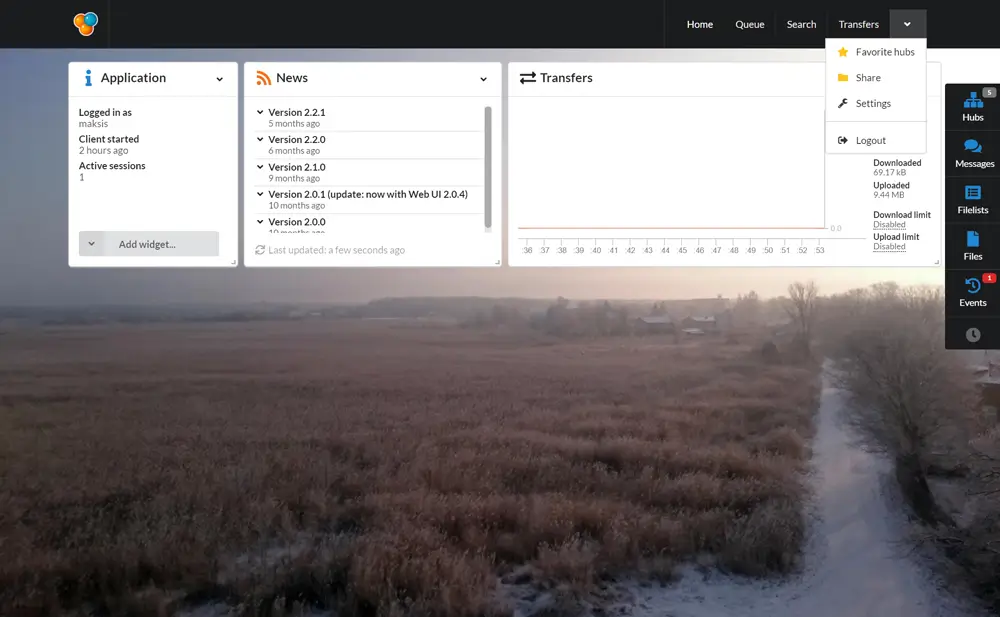
AirDC++ is a modern client for Advanced Direct Connect and Direct Connect networks. It allows you to join “hubs” to chat with other users, perform searches, and browse their shared files. This powerful tool offers a straightforward way to connect with others and access the files you need.
Connect with a global community and share files effortlessly. AirDC++ is the ultimate file-sharing client that simplifies sharing with friends and like-minded users, whether they are nearby or across the globe. The application works across both local and wide area networks, providing a flexible and powerful tool for all your file-sharing needs.
Experience an ultra-powerful, completely ad-free file-sharing client. AirDC++ is a high-performance application with advanced features that let you handle millions of files and terabytes of data without any issues. With its open-source code and zero bundled software, you get a reliable, powerful, and secure tool for all your file-sharing needs.
AirDC++ is a high-performance file-sharing client with a wide range of advanced features. The program has been tested to operate smoothly even with millions of shared files or hundreds of terabytes of data. As an open-source application with no bundled software or advertisements, you get a clean, reliable, and powerful tool.
AirDC++ feature highlights:
- An easy-to-use settings wizard for new users
- Allows sharing different directories in different hubs
- Real-time monitoring for share changes
- Possibility to open multiple connections to one user
- Full IPv6 support
- Grouping of queued files into directories
- Possibility to add your own searches that will be searched for regularly and downloaded automatically when found
- Advanced sharing of partially downloaded directories/files and a more efficient way of finding alternative sources
- Support for NMDC and ADC protocols and encrypted transfers on both
- Bandwidth controlling capabilities
AirDC++ – Pros & Cons
| Pros | Cons |
|---|---|
| ✓ Connects to Direct Connect hubs for searching, browsing, chatting, and sharing files across local or wide-area networks. | ✗ The Direct Connect model requires users to find and join suitable hubs, making setup dependent on the available hub communities and their rules. |
| ✓ Handles very large shared collections, with the provided overview reporting support for millions of files and hundreds of terabytes of data. | ✗ Its extensive sharing, search, hub, transfer, and bandwidth controls can be more complicated than a basic file-transfer application. |
| ✓ Supports NMDC and ADC protocols with encrypted transfers on both, plus full IPv6 support. | ✗ Partial file sharing is no longer supported in NMDC hubs, reducing functionality for users relying on that protocol. |
| ✓ Provides advanced sharing and download features, including multiple connections to one user, alternative-source discovery, queued-file grouping, and automated searches. | ✗ The provided requirements list support only for Windows 10 and 11, with no macOS or Linux version listed. |
| ✓ Includes bandwidth controls and a settings wizard for new users while remaining open source and free of bundled software and advertisements. | ✗ Some of the advanced functionality, such as encrypted transfers, automated searches, alternative-source handling, and multi-connection transfers, is geared toward experienced Direct Connect users. |
Frequently Asked Questions
What are the key changes and removals in AirDC++?
AirDC++ shifts the license to GPLv3, updates Node.js to 22.19.0, lowers the default minimum search interval, improves duplicate detection, and lets the operating system handle default listening ports and the file explorer when opening folders. It also removes partial file sharing in NMDC hubs and drops support for loading legacy web-server XML settings introduced before version 4.10.
Which operating systems and download formats are listed for AirDC++?
The requirements list support for Windows 11 and Windows 10 (32-bit and 64-bit). Available downloads are listed at 106 MB and include a standard installer alongside portable 32-bit (x86) and 64-bit (x64) archives.
What automation and sharing features help users find and transfer files?
Users can share different directories across different hubs with real-time monitoring for share changes and advanced sharing of partially downloaded files or directories. It also supports opening multiple connections to a single user, grouping queued files into directories, finding alternative sources, controlling bandwidth, and saving recurring searches to download matches automatically.
How does AirDC++ handle large file collections, and what protocols does it support?
AirDC++ is designed to handle large libraries—tested with millions of shared files and hundreds of terabytes of data—across local and wide-area networks. It supports both NMDC and ADC protocols with encrypted transfers on both, along with full IPv6 support.
What is the difference between AirDC++ and qBittorrent?
AirDC++ is a client for Direct Connect (DC) and Advanced Direct Connect (ADC) networks where users connect to hubs to search, chat, and share files directly with peers. qBittorrent is a BitTorrent client built around torrent files and magnet links rather than Direct Connect hubs. Users participating in DC/ADC hub communities look to AirDC++, while those sharing via BitTorrent swarms use qBittorrent.
What’s New in AirDC++ 4.30:
Changed
- Changed the license to GPLv3.
- Allow the operating system to choose the default listening ports instead of assigning random ones.
- Improve chat link detection and parsing.
- Let the operating system choose the correct file explorer when using “Open folder” (#461)
- Add timestamps in the CDM debug frame
- Lower the default minimum search interval
- Lower the auto reconnect delay on severe flood
- Idle (finished) download connections can now be forced
- Show spam rate when receiving CTM/search/incoming connection flood
- Improve parsing of relative config paths in dcppboot.xml
- Parse HBRI validation addresses received from the hub with the correct IP protocol
- Dupe detection is now more accurate
- Internal: rewrite build system to use CMake, use vcpkg for third-party libraries, and new scripts for localizations
- Support all string field types for extension settings, and add a multiline text field.
- Node.js updated to 22.19.0
Fixed
- Show a proper error message for unclean TLS connection closures
- Fix an error when loading the previously opened own file list on startup
- Fix possible issues with duplicate CIDs being generated for different clients
- Ensure that the hub column stays up-to-date for transfer
- Don’t attempt to start filelist downloads via an incorrect hub when the user comes online
- Various filelist-related bug and crash fixes
- Fix an incorrect error message when removing NAT-PMP port mappings
- Add/remove port mappings when the auto detection mode is enabled/disabled
- Fix the “engname” country format param
- Avoid unneeded list filter iterations
- Don’t incorrectly announce bundles to be shared if nothing was added
- Fix a possible incorrect “User offline” error for transfers
- Prevent adding duplicate search extensions for search types; fix adding extensions separated with ;
- Ensure that no duplicate search results are being sent
- Detect all auto speed limits correctly from the limiter values
- Fix a possible memory leak in the MiniUPnPc mapper (DC++)
- Other misc stability fixes
Removed
- Partial file sharing is no longer supported in NMDC hubs
- Support for loading legacy XML settings for the web server (the new format was added in AirDC++ 4.10)
Official Homepage – https://airdcpp.net
Supported Operating Systems: Windows 11, 10 (32-bit, 64-bit).